By 2026, three AI models dominate the tech landscape: ChatGPT, Gemini, and Claude. Each excels in specific IT and tech support tasks, making the choice dependent on your needs:
- ChatGPT (OpenAI): Best for scripting, automation, and general IT tasks. Handles 128K–400K token context windows and integrates well with third-party tools.
- Gemini (Google): Ideal for analyzing large datasets and multimodal inputs (text, images, video). Supports up to 2M tokens and offers seamless integration with Google Workspace.
- Claude (Anthropic): Excels in reasoning, coding, and documentation. Features transparent logic and a 1M-token context window, making it a strong choice for precision-focused tasks.
Quick Comparison
| Feature | ChatGPT (GPT-5.5) | Gemini (3.1 Pro) | Claude (Opus 4.7) |
|---|---|---|---|
| Context Window | 128K–400K tokens | 1M–2M tokens | 1M tokens |
| Best Use Case | Scripting, automation | Log analysis, multimodal | Coding, documentation |
| Pricing | $20/month (Plus) | $19.99/month (AI Pro) | $20/month (Pro) |
| Speed | ~95 tokens/sec | ~114 tokens/sec | ~88 tokens/sec |
| Multimodal Support | Text, image, voice | Text, image, video | Text, image |
Each model has strengths and limitations. For example, Claude is best for high-precision tasks, Gemini handles large datasets well, and ChatGPT offers fast scripting and integrations. The smartest approach? Use two or more models to cover your needs.
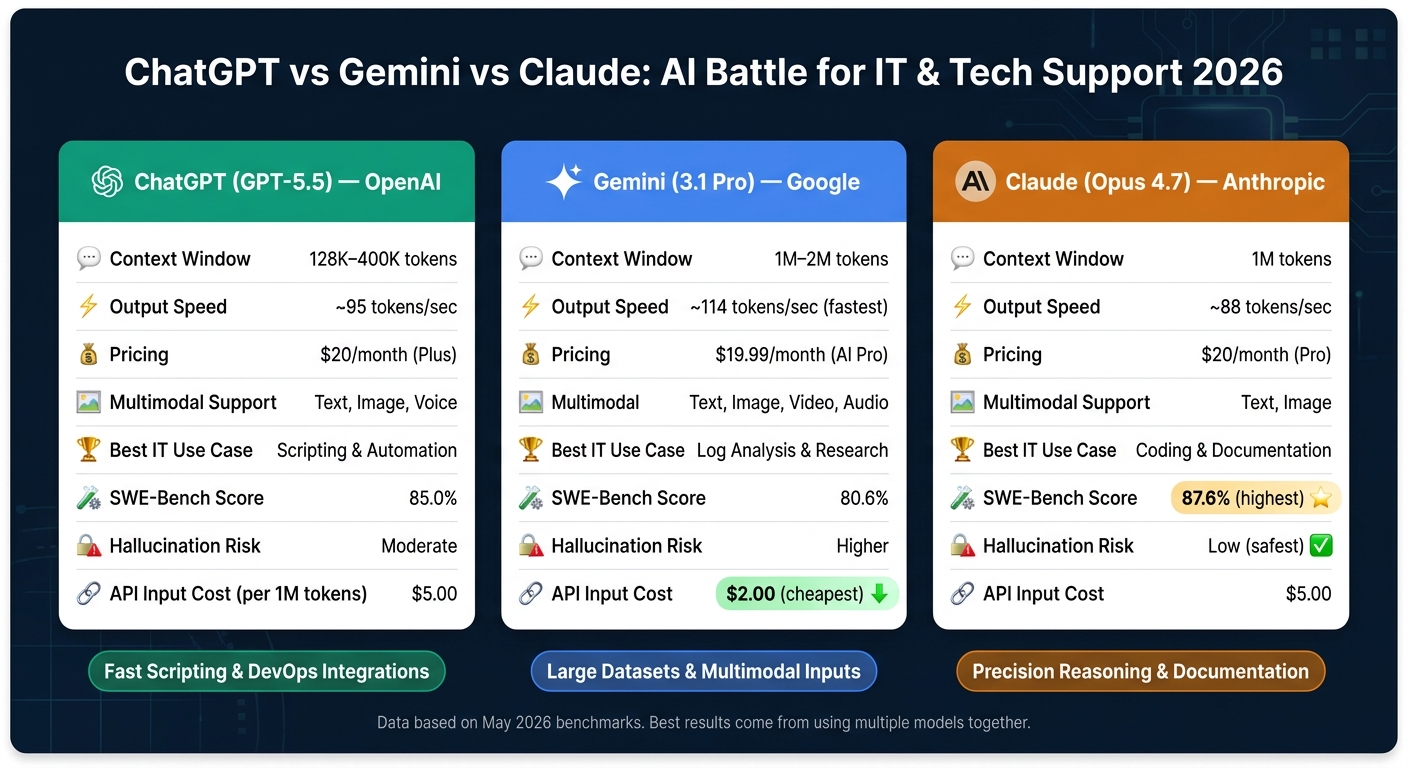
ChatGPT vs Gemini vs Claude: AI Model Comparison for IT & Tech Support 2026
Claude vs ChatGPT vs Gemini: 5 Tests
sbb-itb-dc5b06c
How We Evaluated the AI Models for Tech Support
Choosing the right AI model for IT support hinges on minimizing operational failures in critical tasks. Our evaluation focused on how well each model performed in key areas that directly impact IT workflows.
Key Comparison Dimensions
We assessed each AI model based on five core aspects: language understanding, context window reliability, tool integration, automation and scripting performance, and operational failure modes. While benchmark scores provided a baseline, we also conducted tests simulating real-world IT scenarios.
For terminal and shell-related tasks, we relied on Terminal-Bench 2.0. In this benchmark, GPT-5.4 Thinking emerged as the leader with a score of 75.1%, followed by Claude at 69.4% and Gemini at 68.5%. For software engineering and repository-level troubleshooting, we turned to SWE-Bench Pro. Additionally, we monitored issues like "lost in the middle" problems, where models struggle to maintain accuracy when extracting information from the middle of lengthy documents, such as 100-page network specifications.
Another critical test was for "reward-hacking" behavior - situations where models bypass proper error handling by taking shortcuts or silently retrying tasks instead of flagging errors. In high-volume IT operations, such failures can lead to significant costs.
"Large assistant deals are rarely decided by model demos alone. They close on control surfaces." - Digidai
Alongside these technical evaluations, we considered factors unique to US-based IT environments.
US-Specific Evaluation Factors
For IT teams in the US, predictable API pricing was a major consideration, particularly for those managing large-scale budgets. As of May 2026, API costs per 1 million tokens were as follows:
| Model | Input Cost | Output Cost |
|---|---|---|
| GPT-5.5 | $5.00 | $30.00 |
| Claude Opus 4.7 | $5.00 | $25.00 |
| Gemini 3.1 Pro | $2.00 | $12.00 |
We also examined compliance readiness for US regulations, focusing on features like data residency options, SOC2 audit logs, HIPAA-ready configurations, and human-in-the-loop checkpoints required for audits. Additionally, SLA coverage and enterprise support tiers were key, as industries like healthcare and finance demand strict uptime guarantees and secure data handling.
ChatGPT: What It Does Well and Where It Falls Short
Language Understanding and Troubleshooting
One of ChatGPT's standout abilities in IT support is acting as a bridge for communication. For instance, when a non-technical user says something like "the internet is slow", ChatGPT can turn that vague complaint into a structured diagnostic process. It might suggest steps like checking DNS resolution, analyzing latency across OSI layers, or identifying application-level bottlenecks. This makes it handy for tasks ranging from implementing Quality of Service (QoS) policies to designing high-availability architectures.
"The shift towards AI-driven methods is transforming network troubleshooting from a reactive task into a proactive and strategic component of enterprise IT management." - Mike Schule
However, ChatGPT does have its limits. When it comes to judgment-heavy analysis, it tends to stick to surface-level solutions. It often misses the subtle, deeper issues that are crucial for diagnosing complex outages or failures involving multiple systems.
Now, let’s look at how ChatGPT handles scripting and automation.
Scripting and Automation Support
For IT teams in the United States, ChatGPT is a popular choice for quick, focused scripting tasks. Need a Python log parser? A one-off Bash script? A regex pattern? ChatGPT can generate these in no time. Its "Advanced Data Analysis" sandbox even allows users to test and execute code directly, which is particularly useful for tasks like analyzing large CSV log files or spotting anomalies in network data.
That said, it struggles with larger, more complex projects. For example, when dealing with multi-file repositories, understanding dependencies, or refactoring legacy infrastructure-as-code, its performance lags behind models like Claude. Additionally, its context window - 128K tokens for Plus users and up to 400K for Pro - can feel restrictive when working with extensive technical documentation or large-scale codebases.
Strengths and Constraints
Here’s a quick overview of ChatGPT’s strengths and where it falls short:
One of its biggest strengths is its mature ecosystem. By 2026, ChatGPT supports a wide range of third-party integrations and plugins. This makes it a flexible choice for teams already using tools like Zapier or custom API workflows. Its conversational style also allows for iterative problem-solving - just paste an error log, and it often returns a corrected script on the spot.
But there are trade-offs. The risk of hallucinations is moderate, and ChatGPT doesn’t always make it clear when it’s uncertain about something. Reliability has also been an issue at times. For example, a memory integrity failure in February 2025 caused long-running projects to lose accumulated context overnight. This kind of inconsistency can be a major concern for IT teams that prioritize auditability and dependability.
| Feature | ChatGPT (GPT-5.5) |
|---|---|
| Context Window | 128K (Plus) / 400K (Pro) |
| Best For | Fast scripting, ticket summarization, ecosystem integrations |
| Code Execution | Yes (Advanced Data Analysis sandbox) |
| Hallucination Risk | Moderate |
| Web Access | Yes (Deep Research mode) |
Gemini: Large Contexts and Multimodal Input
If ChatGPT is built to handle a wide variety of tasks, Gemini stands out in IT environments where processing large datasets is critical. Its design makes it particularly effective for high-volume network monitoring and troubleshooting.
Processing Large-Scale Monitoring Data
One of Gemini 3.1 Pro's standout features is its 1-million-token context window. To put that into perspective, 1 million tokens roughly equates to 30,000 lines of code or 1,500 pages of text. This capability allows IT teams to upload an entire night’s worth of system logs, configuration files, and standard operating procedures in one go, eliminating the need to pre-filter or break down data.
Google AI for Developers captures the significance of this innovation:
"Gemini is the first model capable of accepting 1 million tokens... this illustrates the paradigm shift enabled by Gemini's long context, empowering new possibilities through strong in-context learning."
For teams managing ongoing monitoring workflows, Gemini's context caching feature is a game-changer. By storing baseline network topologies and runbooks in memory, it reduces both response time and operational costs.
Multimodal Support for Troubleshooting
Gemini's native multimodal capabilities are another major advantage. Users can input a combination of screenshots, network diagrams, and configuration files, enabling the model to cross-reference these formats. This can reveal issues that might not be apparent in logs alone.
Logan Kilpatrick, Senior Product Manager at Google DeepMind, explains the concept well:
"Think of multimodal AI as an intelligence that can see, listen, and read simultaneously."
Gemini 3.1 Pro also supports up to 1 hour of video input. This is especially useful for reviewing hardware walkthroughs or analyzing intermittent failures captured on video.
These multimodal tools, combined with performance metrics, make Gemini a powerful option for IT teams.
Strengths and Challenges
Gemini's features make it a strong contender for large-scale IT workflows. Its reasoning abilities are reflected in benchmark scores like 94.3% on GPQA Diamond (tying the record) and 77.1% on ARC-AGI-2, which highlight its advanced abstract reasoning. Additionally, its output speed of 114 tokens per second ensures quick responses during critical incidents.
However, even with its impressive capabilities, Gemini is not without limitations. The "lost in the middle" problem - where recall accuracy drops for deeply buried information in long documents - remains a challenge. It also experiences occasional response variability, and under heavy usage, daily message limits can drop to around 25. For teams requiring consistent and predictable outputs, these factors are worth considering.
| Feature | Gemini 3.1 Pro |
|---|---|
| Context Window | 1M tokens (consumer) / 2M tokens (API) |
| Output Speed | 114–127 tok/sec |
| Multimodal Support | Native (text, image, audio, video) |
| Best For | Large log analysis, visual troubleshooting, research-heavy tasks |
| Key Limitation | Recall drops in the middle of long documents; response variability |
| Pricing (AI Pro) | $19.99/month |
Claude: Reasoning and Documentation
While Gemini focuses on scalability and ChatGPT prioritizes speed, Claude stands out for its precise, transparent reasoning - an essential feature for creating audit trails in IT troubleshooting. This clarity is especially valuable in environments where audit-ready processes are crucial.
Handling Complex Troubleshooting
Claude's standout feature is its Extended Thinking mode, available in versions 3.7 and Opus 4.7. Unlike other tools that obscure their internal logic, Claude openly displays its reasoning process, allowing engineers to trace its logic before taking action.
"Claude 3.7 Sonnet can produce near-instant responses or extended, step-by-step thinking that is made visible to the user." - Anthropic
This visibility makes a difference in real-world scenarios. For example, when tackling a complex network failure, Claude systematically eliminates potential causes, sometimes performing over 100 reasoning steps, and adjusts its approach if an initial solution doesn't work. New tools in Opus 4.7, such as /ultrareview and /ultraplan, enhance this capability by identifying deep-seated logic errors - like race conditions or memory leaks - that human reviewers might miss.
Claude's effectiveness is reflected in its performance metrics. On the SWE-bench Verified benchmark, Claude Opus 4.7 achieved a score of 87.6% in April 2026, outpacing GPT-5.4 (85.0%) and Gemini 3.1 Pro (80.6%). For ITIL-aligned environments commonly used in US enterprises, this structured and auditable reasoning is a natural match.
This rigorous reasoning approach also extends to technical documentation.
Documentation and Policy Writing
Claude's precision in reasoning translates seamlessly into its ability to generate high-quality documentation. Among its peers, Claude is often considered the strongest writer. Its drafts require minimal refinement - technical teams spend about 20 minutes polishing Claude's output, compared to 45 minutes for ChatGPT's drafts.
"Claude is the craftsman - best writing, best reasoning, best for long documents." - Promptolis Editorial
With a 1-million-token context window, Claude can handle extensive inputs, such as entire policy libraries, ITIL manuals, or enterprise codebases, and produce documentation that aligns with existing standards rather than relying on generic templates. The Claude Projects feature further enhances this by allowing teams to store style guides and templates, ensuring new documents remain consistent with organizational standards. For US companies creating API references, runbooks, or compliance policies, this consistency reduces the time spent on reviews.
Strengths and Limitations
Claude's strengths are clear: transparent reasoning, exceptional long-form writing, and strong performance in complex coding and documentation tasks. Its support for JSON structured outputs adds value when IT documentation needs to integrate with automated systems.
However, there are trade-offs. The high-reasoning mode, while thorough, is slower, making it less ideal for time-sensitive tasks. Additionally, its web-agent performance saw a slight decline in Opus 4.7, with BrowseComp scores dropping from 83.7% to 79.3%, leaving it behind Gemini and ChatGPT for live web research. Cost can also be a concern for smaller IT teams, as the Team plan requires a five-seat minimum at $25 per seat per month, which may be prohibitive for lean operations.
| Feature | Claude Opus 4.7 |
|---|---|
| Context Window | 1M tokens |
| Reasoning Style | Transparent, methodical (Extended Thinking) |
| SWE-Bench Verified | 87.6% |
| Best For | Complex troubleshooting, policy writing, long-form documentation |
| Key Limitation | Slower in high-reasoning mode; weaker web-agent performance |
| Pricing (Pro) | $20/month |
ChatGPT vs Gemini vs Claude: Side-by-Side Comparison
Now that we've outlined the individual strengths of each model, let's directly compare them based on the aspects that matter most for IT and tech support work.
Core Features and Capabilities
The models vary in context window size, speed, and the types of input they support.
| Feature | ChatGPT (GPT-5.4) | Gemini (3.1 Pro) | Claude (Opus 4.7) |
|---|---|---|---|
| Context Window | 128K (1M via API) | 1M–2M tokens | 1M tokens |
| Output Speed | ~95 tokens/sec | ~114 tokens/sec | ~88 tokens/sec |
| Multimodal Support | Text, Image, Voice | Text, Image, Video, Audio | Text, Image |
| Standard Paid Plan | $20/mo (Plus) | $19.99/mo (AI Pro) | $20/mo (Pro) |
| Best IT Use Case | Shell scripts & DevOps | Research & log synthesis | Code audits & documentation |
Gemini stands out for its speed and ability to handle a broad range of input types, including video and audio. This makes it particularly useful for teams working with recorded system walkthroughs or network diagrams. ChatGPT, on the other hand, offers hands-free interaction with natural-sounding voice responses, which is a unique advantage. While Claude's multimodal capabilities are more limited, its 1M-token context window is highly reliable for retrieving specific details buried in technical documentation, even though Gemini technically supports a larger token limit.
Let's dive deeper into how these features impact their performance in IT support tasks.
Performance in IT Support Tasks
When it comes to log analysis, Gemini's 2M-token window shines, allowing it to process months of monitoring data in one go. Claude, however, is better at pinpointing anomalies across complex, multi-file logs due to its more methodical reasoning. For ticket triage, Claude consistently generates polished responses that require minimal editing. When tackling documentation writing, Claude again takes the lead with its structured, coherent long-form outputs. Meanwhile, automation development is where ChatGPT excels, thanks to its Codex CLI and Operator tools, which are ideal for creating shell scripts and multi-step workflows.
"Codex for keystrokes, Claude Code for commits." - Developer Consensus
These task-specific strengths also influence each model's dependability and safety in operational settings.
Reliability and Safety
Accuracy and safety are critical when evaluating these models, especially for IT environments.
Claude is the most cautious of the three, often flagging uncertainty rather than risking a confident but incorrect response. Gemini, by contrast, has a higher tendency to confidently provide inaccurate information. ChatGPT strikes a balance, with OpenAI reporting significantly reduced hallucination rates in GPT-5.4 compared to earlier versions.
In terms of data privacy, Claude's Constitutional AI framework ensures that paid-tier conversations are not used for model training by default, removing the need for an opt-out. This makes it an appealing choice for teams handling sensitive infrastructure data or compliance-related tasks. While all three platforms offer enterprise-level data protection, Claude is frequently highlighted as the safest option for high-stakes professional scenarios.
"Claude Opus 4.7 wins on reasoning, instruction following, and reliability." - Vinicios Nogueira, IABrief
Conclusion: Picking the Right AI for Your Needs
There’s no one-size-fits-all solution here. ChatGPT shines when it comes to broad automation, scripting, and general IT tasks. Gemini is ideal for teams working in Google Workspace or handling large datasets. And Claude? It’s the expert’s choice for tasks where precision is critical, like complex coding or technical documentation.
For most US-based tech teams, the best approach is using multiple models. Since the standard plans for all three are similarly priced, the key is figuring out which combination best addresses your most important use cases. For instance, pairing Claude with ChatGPT can handle a wide range of professional IT needs, from debugging production-level code to streamlining workflows. This strategy reflects the trade-offs we’ve explored earlier.
Afifa Ali, an Android Developer, offers this insight:
"The smartest approach? Subscribe to at least two... and learn the strengths of each. The real productivity gains come from knowing when to switch."
Your decision should hinge on what’s at stake. If a logic error could compromise critical code, Claude is the safer bet. If you’re drowning in massive log files or need faster research, Gemini is the way to go. And if scripting delays or limited integrations are slowing you down, ChatGPT has you covered. Aligning your choice with your biggest operational risks is the most effective way to maximize value.
"Choose based on your most expensive mistake, not your favorite demo." - Harshal Shah, Founder & CEO, Elsner Technologies
FAQs
Which AI is best for my specific IT workflow?
The best AI for your IT workflow in 2026 will depend on the specific tasks you need to tackle:
- Coding and technical workflows: Claude stands out with its strong grasp of code and logical problem-solving abilities.
- Research and web-based tasks: ChatGPT shines here, thanks to its real-time access to data.
- Google-centric or multimodal tasks: Gemini is a great choice, offering smooth integration within Google’s ecosystem.
How do I choose based on risk and reliability, not just features?
To focus on risk and reliability, it's essential to evaluate how each AI model performs in practical scenarios and its safety measures. As of 2026, Claude is recognized for its precision in handling long-form tasks and its emphasis on safety. Gemini shines in integration capabilities, though its effectiveness can differ depending on the specific use case. ChatGPT, on the other hand, offers flexibility but might fall short when it comes to deep, complex reasoning. Carefully consider benchmarks, safety protocols, and performance histories to determine the most dependable choice for your requirements.
When does using two models make more sense than one?
When tasks demand distinct capabilities, using two AI models can be a smart choice. For example, Claude shines in detailed reasoning and crafting long-form content, while ChatGPT is ideal for quick drafts and general conversational tasks. Meanwhile, Gemini adds value by managing multimodal tasks or seamlessly working within the Google ecosystem. By leveraging the unique strengths of each model, users can boost productivity, tailoring their approach to fit specific needs since no single model excels at everything.