If I want a short answer, here it is: there is no single best smart home protocol. I’d use Wi-Fi or Ethernet for cameras and other high-data devices, Zigbee or Z-Wave for battery sensors and locks, and Thread + Matter when I want local control and better cross-brand support.
What matters most is not just speed or range. It’s whether your devices keep working without a company’s cloud. That risk is real: when Insteon shut down in 2022, many cloud-dependent devices stopped working.
Here’s the article in one plain-English list:
- Wi-Fi: easy to start with, but can crowd your router and often leans on the cloud
- Zigbee: low-cost, low-power mesh for sensors and lights
- Z-Wave: pricier, but steady and better at getting through walls
- Thread: low-power IP mesh and the main wireless base for Matter
- Matter: a shared app-layer standard that helps brands work together
- BLE: fine for setup and a few small devices, not great for full-home control
- Ethernet: best for fixed devices that need low delay and steady power
What I’d check first before buying anything:
- Do I want local control or am I okay with cloud apps?
- Am I building for battery sensors, locks, lights, or cameras?
- Do I live in an apartment with lots of 2.4 GHz noise?
- Do I need devices from different brands to work in one system?
- Does my router support IPv6 if I plan to use Matter?
Matter vs ZigBee vs WiFi vs Bluetooth vs Thread vs ZWave - Which is the BEST Smart Home Network?
sbb-itb-dc5b06c
Quick Comparison
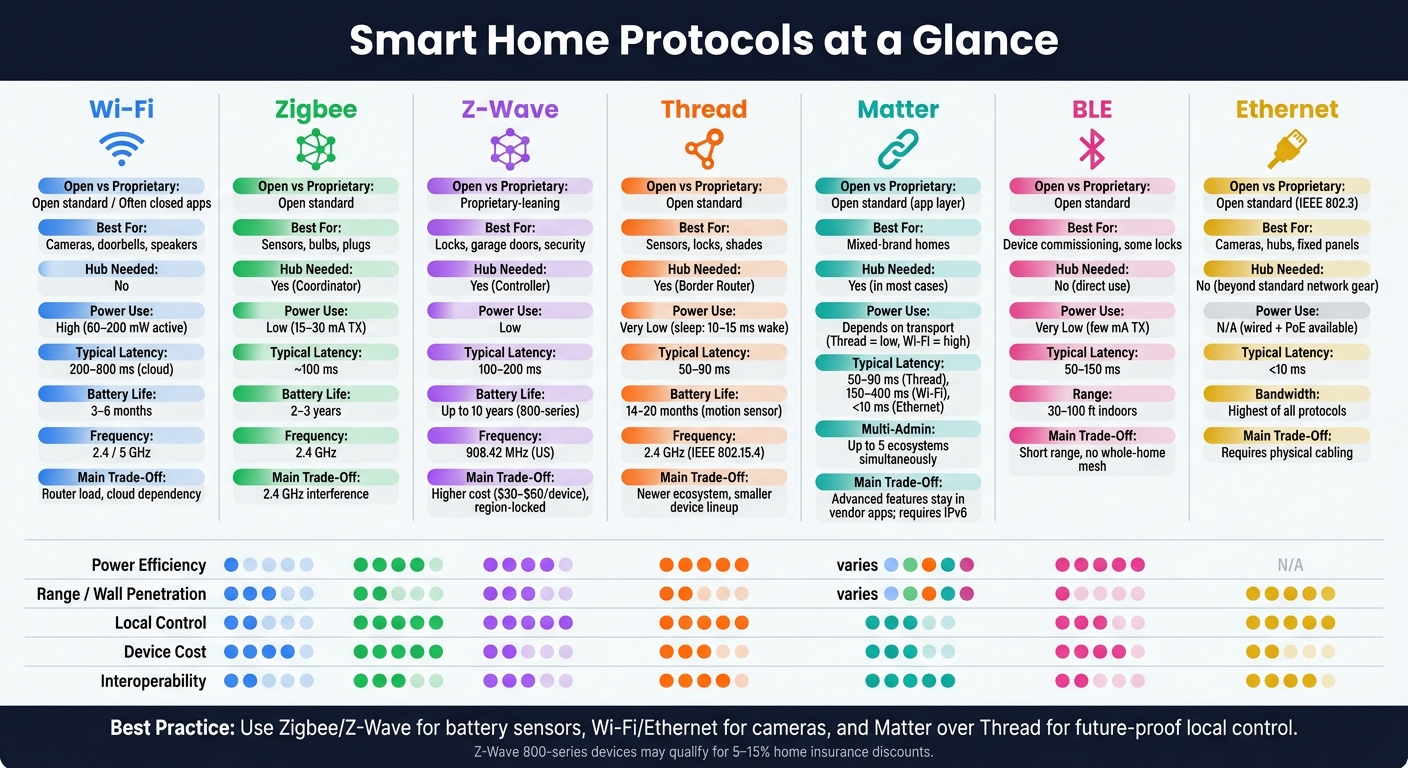
Smart Home Protocols Compared: Wi-Fi vs Zigbee vs Z-Wave vs Thread vs Matter vs BLE vs Ethernet
| Protocol | Open vs Proprietary | Best For | Main Trade-Off | Hub Needed? |
|---|---|---|---|---|
| Wi-Fi | Open standard, often closed apps | Cameras, doorbells, speakers | High power use, router load, cloud tie-ins | No |
| Zigbee | Open standard | Sensors, bulbs, plugs | 2.4 GHz interference, needs coordinator | Yes |
| Z-Wave | Proprietary-leaning | Locks, garage doors, security devices | Higher device cost, region lock | Yes |
| Thread | Open standard | Low-power sensors, locks, shades | Newer device lineup, needs border router | Yes |
| Matter | Open standard at app layer | Mixed-brand homes | Some features still stay in vendor apps | Yes, in most cases |
| BLE | Open standard | Pairing, a few small devices, some locks | Short range, weak whole-home scaling | No, for direct use |
| Ethernet | Open standard | Cameras, hubs, fixed panels | Requires cabling | No, beyond normal network gear |
Bottom line: if I care about privacy, uptime, and local use, I’d lean toward Zigbee, Z-Wave, Thread, and Ethernet, then use Matter where it helps tie brands together.
1. Wi-Fi
Wi-Fi is the starting point most people know, mostly because it’s already in the house.
Openness
Wi-Fi runs on the open IEEE 802.11 standard. But in practice, many smart home devices still lock day-to-day control inside their own apps and cloud systems. That means even simple actions can depend on a company’s servers.
A few brands take a more local approach. Shelly and LIFX offer documented local HTTP or MQTT APIs that work without the cloud. And open-source firmware like ESPHome or Tasmota can replace stock firmware on many ESP-based Wi-Fi devices. Matter-over-Wi-Fi is also pushing things toward local-first control across Apple, Google, and Amazon ecosystems, without proprietary bridges.
That’s the trade-off in plain English: Wi-Fi is a good fit for a small number of higher-bandwidth devices, but not for a whole home packed with sensors.
Topology & Range
Wi-Fi uses a star topology, which means every device talks straight to your router or access point. Indoor coverage is usually around 100 feet, but brick or concrete walls, plus multiple floors, can cut that down.
Most home routers start to struggle somewhere around 30–50 active clients. So people who’ve built larger setups often move low-bandwidth gear like motion sensors and door contacts to Zigbee or Thread. Then they keep Wi-Fi for devices that actually need the extra throughput.
Power & Performance
Wi-Fi uses too much power for most battery devices. In active receive mode, a Wi-Fi radio usually draws about 60–200 mW.
That shows up fast in battery life:
- A Wi-Fi motion sensor may last only 3–6 months on a battery
- A Zigbee version can last 1–2 years on the same cell
Where Wi-Fi shines is on devices that need a lot of data moved back and forth, like security cameras, video doorbells, smart displays, and media players.
Interoperability & Security
The biggest long-term downside with Wi-Fi is cloud dependence. It ranks poorly for cloud-free control, and when commands have to travel through the cloud, delays can become noticeable. Typical round trips land around 200–800 ms.
Security has two layers here, and it’s easy to mix them up. WPA3 protects the Wi-Fi link itself, but it doesn’t secure the app layer. So a device using unencrypted MQTT can still be exposed, even on a WPA3 network. Matter deals with that by requiring TLS 1.3 at the app layer. It also helps to put smart devices on a VLAN so they stay separate from your main network.
Wi-Fi is at its best when speed matters. It’s at its worst when you need lots of always-on, low-power devices. For dense setups with many sensors, mesh options like Zigbee and Thread usually make more sense.
2. Zigbee
If Wi-Fi is built for bandwidth, Zigbee is built for lots of low-power devices. That makes it a strong fit for dense sensor networks. There are more than 500 million Zigbee devices in the field, and Zigbee sensors often start at around $8 to $15.
Openness
Zigbee is an open CSA standard, but things can still get messy from one brand to another. In practice, vendor quirks can split the market. Some manufacturers, including Philips Hue, have at times leaned toward their own ecosystems.
That said, open-source tools help smooth out a lot of those rough edges. Zigbee2MQTT and Home Assistant support more than 3,500 devices from 400+ manufacturers. Zigbee also needs a hub to bridge into IP networks. That can make setup and management simpler, but it also ties you more closely to the hub and its ecosystem.
Topology & Range
Zigbee uses a self-healing mesh, which is one of its big selling points. Mains-powered devices like smart plugs and in-wall switches act as routers and extend the network. Battery-powered sensors keep things lean: they connect to the nearest router, but they don't relay traffic for other devices.
Indoor range is about 30 to 100 feet per hop. In a larger home, that usually means you may need a powered device every 20 to 30 feet to keep the mesh steady. A simple rule of thumb: add your mains-powered devices first, then pair battery sensors after that. It gives the network a stronger base from the start.
Power & Performance
Zigbee uses far less power than Wi-Fi. Zigbee radios draw about 15 to 30 mA when transmitting, while Wi-Fi typically draws 100 to 400 mA. That gap matters a lot for small battery devices.
For example, a Zigbee door sensor can run for 2 to 3 years on a single coin cell. Speed is solid too. Response times are usually around 100 ms, which is fast enough for lights and other automations that need to react right away.
Interoperability & Security
If you're buying Zigbee gear today, it's smart to stick with Zigbee 3.0 devices. Older versions like HA 1.2 had optional security and could send some data in cleartext. Zigbee 3.0, released in 2016, requires AES-128 encryption.
Even with that, Zigbee's network key model is still seen as less strong than Matter's device attestation system. There's also the 2.4 GHz issue. Zigbee shares that band with Wi-Fi and Bluetooth, so interference can show up in crowded U.S. homes. One common fix is to set your coordinator to channel 25 or 26, which helps avoid overlap with standard Wi-Fi channels 1, 6, and 11.
Zigbee works best for low-power sensor networks; the next protocol trades some of that flexibility for a different kind of range and reliability.
3. Z-Wave
If Zigbee tends to win on device density, Z-Wave usually wins on reliability and consistency.
Z-Wave is a proprietary-leaning protocol built with strict certification rules. Silicon Labs owns the protocol, and every device has to pass mandatory certification before it hits store shelves. That process adds cost, so Z-Wave devices often land in the $30 to $60 range. That's about 20% to 40% more than similar Zigbee gear. Even a Z-Wave 800-series USB stick costs about $45.
The trade-off is pretty clear: you pay more, but you usually get fewer compatibility headaches. Since every product goes through the same certification process, cross-brand support is much more reliable than with many open protocols.
Topology & Range
Z-Wave uses a mesh network. In plain English, mains-powered devices act as repeaters and help push the signal across your home.
Classic Z-Wave supports up to 232 devices. Z-Wave Long Range pushes that limit to 4,000 devices and removes multi-hop delays. ZWLR can also reach up to 1,100 feet outdoors with a clear line of sight.
In the US, Z-Wave runs on 908.42 MHz, which sits in the sub-GHz band and doesn't overlap with Wi-Fi or Bluetooth. That's a big deal. Lower-frequency signals tend to move through walls more easily, and there's less radio noise to fight through. In one set of tests, Z-Wave made it through three brick walls, while Zigbee dropped after one.
Power & Performance
Z-Wave 800-series hardware is efficient with battery use. Sensors built on this generation can run for up to 10 years on a single battery. In testing, CR2032 coin cells lasted about 3.1 years.
Latency usually sits between 100 ms and 200 ms. That's fast enough for the jobs most people care about, like locks, motion sensors, and lights.
Interoperability & Security
Z-Wave S2 is required on Z-Wave Plus v2 devices. It uses QR-code pairing and AES-128 encryption, which makes pairing more secure.
There is one rule you don't want to ignore: never mix regions. Z-Wave is region-locked. US devices use 908.42 MHz, while EU devices use 868.42 MHz. If you import a device from another region, it won't talk to your local hub.
For hub support, modern options like Hubitat C8 and Aeotec SmartThings can bridge Z-Wave devices into Matter setups. That means those devices can show up in Apple Home or Google Home.
Next up is Thread, which brings mesh networking into the IP world.
4. Thread
Thread keeps the mesh approach of Zigbee and Z-Wave, but it drops the extra translation step by using IPv6 natively. It’s an open wireless mesh protocol built on IEEE 802.15.4. Because it speaks IP from the start, each device gets its own IPv6 address and can talk straight to other IP devices. Thread also acts as Matter’s wireless base, which helps cut down on vendor lock-in. It sits in that middle ground between low-power mesh networking and direct IP communication.
Openness
As of Jan. 1, 2026, Thread 1.4 is required for new Border Router certification. The device lineup is still smaller than Zigbee’s, but it already covers common categories such as sensors, locks, and lighting.
Topology & Range
Being IP-native helps Thread keep mesh reliability without pulling in cloud dependence. It uses a self-healing mesh with no single coordinator, so one hub failure doesn’t bring down the whole network. Mains-powered devices work as routers, and the network reroutes traffic on its own when a node fails.
In testing, Thread recovered from a node failure in 1.2 to 1.8 seconds, which was faster than Zigbee’s 3 to 6 seconds and Z-Wave’s 5 to 12 seconds. Indoor per-hop range is usually 30 to 100 feet, and networks can support 250+ devices. Put simply, the more mains-powered routers you have, the stronger the mesh tends to be.
Power & Performance
Thread’s low-power design is a strong fit for battery devices like motion sensors, door/window contacts, leak sensors, and smart locks. Its sleep scheduling allows devices to wake up, send data, and go back to sleep in 10 to 15 milliseconds. In practice, motion sensors average 14 to 20 months on a CR2032 coin cell.
It also delivers the lowest real-world latency among common smart home protocols, with local automations usually landing in the 50 to 90 millisecond range. That’s the kind of speed you notice when a motion sensor triggers a light and it turns on without that awkward beat.
Interoperability & Security
Thread 1.4 added credential sharing, which lets border routers from different vendors join one unified mesh instead of spinning up split, competing networks. That’s a big deal in mixed-brand homes, where separate meshes can turn setup into a headache.
On the security side, Thread uses AES-128 encryption with DTLS and certificate-based authentication during commissioning. Setup uses standardized QR codes, and keys are exchanged locally.
For steady coverage, use at least two Thread Border Routers so you don’t end up with a single point of failure. For the most stable backbone, connect them over Ethernet.
5. Matter
Matter is a common language, not a radio signal. It runs over Thread, Wi-Fi, and Ethernet, and it standardizes how devices read and act on commands. Put simply, Matter is an open standard that helps smart home devices from hundreds of brands work together. Its main job is to standardize control across different transports, not replace them.
Openness
Matter is governed by the Connectivity Standards Alliance (CSA), with backing from Apple, Google, Amazon, and Samsung. Its SDK is open-source and royalty-free. As of early 2026, more than 4,000 Matter-certified products span dozens of categories.
That sounds great on paper, but there’s a catch. Matter still leaves many advanced features inside vendor apps. Certification does not guarantee feature parity: many devices expose only basic controls through Matter and keep advanced features inside proprietary apps. So yes, Matter cuts down on lock-in, but brands still keep some control where it counts.
And the layer underneath still shapes the day-to-day experience. Speed, power use, and range still depend on the transport doing the work.
Topology & Range
| Transport | Topology | Typical Latency | Best For |
|---|---|---|---|
| Thread | Self-healing mesh | 50–90 ms | Sensors, locks, bulbs |
| Wi-Fi | Star (router-dependent) | 150–400 ms | Cameras, doorbells, plugs |
| Ethernet | Star (wired) | <10 ms | Wired devices |
Power & Performance
Matter-over-Thread battery devices last far longer than Matter-over-Wi-Fi sensors. That’s a big deal if you’re putting sensors in awkward places like high corners, garages, or behind appliances. In most cases, Matter-over-Wi-Fi devices need to stay plugged in.
Interoperability & Security
Matter's Multi-Admin feature is one of its strongest practical advantages. A single device can connect to up to five different ecosystems at the same time, so Apple Home, Google Home, Amazon Alexa, and Samsung SmartThings can all control the same smart plug simultaneously.
Matter uses AES-128-CCM encryption and Device Attestation Certificates (DAC) to verify device identity before pairing. That built-in check helps keep counterfeit hardware out. Even so, some Matter-over-Wi-Fi devices still check in every 6 to 72 hours despite Matter's local-first design. After setup, block internet access and make sure local control still works.
For shorter-range devices with simpler pairing, Bluetooth Low Energy is the next trade-off.
6. Bluetooth Low Energy (BLE)
BLE is easy to set up and fits small devices well, especially when you don’t want a hub. But it doesn’t scale well once you move past a handful of endpoints. That’s why BLE works better as a convenience protocol than as the main protocol for a whole home.
Openness
BLE is an open standard managed by the Bluetooth SIG, so manufacturers can build with it without one company controlling the standard. But an open radio standard doesn’t always lead to an open user experience. In many cases, BLE devices still depend on a brand-specific app, which can lock control to that vendor unless the device is tied into a larger ecosystem.
Inside the Matter ecosystem, BLE now plays a narrower role. It’s mainly used for commissioning: the first discovery and secure pairing step. After that, the device usually switches over to Thread or Wi-Fi for day-to-day communication. Put simply, BLE helps the device get connected, but another protocol handles the steady work afterward.
Topology & Range
BLE does well at small scale because it was built mostly for point-to-point links. Bluetooth Mesh does exist, but it’s seen far more in commercial lighting than in consumer smart home setups.
Indoor range is usually around 30 to 100 feet, with Class 2 devices often landing closer to 30 feet indoors. That’s shorter than Z-Wave’s 30+ meter range, which makes BLE less suited to full-home coverage. Bluetooth Mesh can, in theory, support up to 32,767 nodes, but that number doesn’t change the fact that mesh Bluetooth is still uncommon in most consumer smart homes.
There’s also a practical catch. If a BLE device depends on a phone for control, it can become unreachable when that phone leaves the house. A hub can fix that, but now you’ve added one more layer to manage.
Power & Performance
BLE uses only a few milliamps while transmitting, which is much lower than Wi-Fi. That low power draw is a big reason it works well for battery-powered sensors and locks that need to last a long time.
The trade-off is speed. BLE is slower to respond than Zigbee, Z-Wave, or Thread, with typical latency around 50 to 150 ms. That may not sound like much on paper, but in motion-triggered lighting or other time-sensitive automations, you can feel the delay.
Interoperability & Security
BLE’s big advantage is simple: almost every smartphone supports it. That makes it a good fit for smaller setups where you want direct phone control and no hub. Philips Hue Bluetooth works this way for smaller, phone-only setups, while brands like SwitchBot use hubs to bridge BLE devices into Matter, Apple Home, or Google Home. It can work well, though it also means one more dependency in the system.
On the security side, BLE uses AES-128 CCM encryption and is generally seen as secure for residential use. The pairing step is where security matters most.
7. Ethernet
For fixed devices, Ethernet is the cleanest local-first option. It’s wired, not wireless, and that one detail changes a lot. It affects speed, stability, placement, and the kind of trade-offs you make.
Openness
Ethernet is a fully open standard governed by the IEEE under the IEEE 802.3 specification. Any manufacturer can build Ethernet-compatible hardware without paying licensing fees to a single gatekeeper. The transport layer is open, though lock-in can still show up at the app layer.
Topology & Range
Ethernet uses a star topology, which means each device connects straight to a central router or switch. That’s different from the self-healing mesh networks used by Zigbee, Thread, and Z-Wave. With Ethernet, cable length matters more than wireless signal reach.
The bigger issue is installation. Running cable through finished walls is real work, which makes Ethernet a tougher sell for retrofitting an existing home.
In new construction, though, Ethernet is often the smart call. Putting drops in every room gives you a stable wired base, and wired links sidestep client-count limits entirely.
Power & Performance
This matters most for always-on devices that need steady power and low latency. One of Ethernet’s handiest features is Power over Ethernet (PoE), which sends both data and electrical power through a single cable. That keeps cameras, hubs, and touch panels powered and connected without extra wiring clutter.
Ethernet delivers the highest bandwidth and the most consistent sub-10 ms latency here. That makes it a strong match for 4K security cameras, video doorbells, and other media-heavy gear. Zigbee and Thread top out around 250 kbps, which isn’t even close to enough for video.
Interoperability & Security
Ethernet is one Matter transport, alongside Wi-Fi and Thread. Matter 1.5, released in November 2025, added standardized support for Ethernet-connected cameras, video doorbells, and intercoms, including live streaming and two-way audio via WebRTC. In plain English, that means broader cross-platform support across Apple Home, Google Home, Amazon Alexa, and Samsung SmartThings.
On the security side, Ethernet-based Matter devices can run fully offline. That avoids the behavior common in many Wi-Fi devices that ping manufacturer servers every 3 to 7 minutes. The result is less cloud dependence and better local control.
Pros and Cons by Household Type
The specs only matter if they fit the home you live in. The best protocol comes down to your space, how many devices you plan to use, and how much local control you want. There isn’t one winner for every home. Your setup should match your living situation, budget, and privacy preferences.
Small apartments are often a good match for Matter over Wi-Fi because you don’t need a separate hub, and it works with a standard home router. But apartment buildings can be rough on 2.4 GHz signals. When nearby networks crowd the airwaves, Z-Wave 800 is often the better choice because its sub-GHz frequency sidesteps that interference.
Large multi-story homes usually benefit from a mix. Z-Wave 800 works well for locks and garage doors because it handles walls better, while Zigbee is a lower-cost way to support lots of lights and sensors.
Renters face a different issue: moving. You may not want to leave a hub behind or rebuild your setup from scratch in a new place. Matter makes that easier because devices can move across major ecosystems without tying you to one hub. For homeowners, a layered setup tends to make more sense: Z-Wave for locks and garage doors, Zigbee for bulk lighting, and Thread/Matter for newer devices.
If privacy matters most, Z-Wave or Zigbee with a local controller such as Home Assistant or Hubitat is usually the better route. Both run locally and don’t depend on the internet. If cost is the main concern, Zigbee often comes out ahead, especially for sensors and large lighting upgrades.
The table below turns those trade-offs into quick household picks.
| Protocol | Pros | Cons | Ideal Device Types | Hub Needed? | Best-Fit U.S. Use Case |
|---|---|---|---|---|---|
| Matter (Thread/Wi-Fi) | Works across mixed-brand homes; broad vendor support | Requires IPv6; some devices still need cloud | Bulbs, plugs, thermostats | Yes (Border Router or controller) | Mixed-brand homes; renters |
| Zigbee 3.0 | Massive device variety; local control | 2.4 GHz interference; requires hub | Bulk lighting, motion/leak sensors | Yes (Coordinator) | Budget upgrades; dense device setups |
| Z-Wave 800 | Sub-GHz; insurance discounts (5–15%) | Highest cost ($30–$60/dimmer); region-locked frequencies | Door locks, security, garage doors | Yes (Controller) | Large/multi-story homes; security-focused |
| Wi-Fi | High bandwidth | Router congestion with lots of devices; cloud dependency | Cameras, doorbells, smart speakers | No | Small apartments; non-technical users |
| Ethernet | PoE support | Requires wiring; not for mobile devices | Hubs, security cameras, base stations | Network switch/router | Cameras, doorbells, and fixed hubs |
| BLE | Easy pairing; no hub for direct phone use | Very short range; no whole-home mesh | Initial device commissioning, some locks | No (for direct use) | Best for commissioning, not whole-home control |
| Thread | Requires Border Router; newer ecosystem | Low-power devices | Sensors, shades, low-power devices | Yes (Thread Border Router) | High-performance sensor networks; future-proofing |
Most solid U.S. setups in 2026 won’t run on just one protocol. Multi-protocol hubs like Home Assistant Green or Hubitat bring Zigbee, Z-Wave, and Matter into one interface, which is often the most practical path for people building a more serious system. One thing to check before picking Matter: router IPv6 support. About 19% of U.S. ISP routers still block IPv6, and that can stop Matter device pairing cold.
Conclusion
Once you compare range, power use, security, and interoperability, the takeaway is pretty simple: there's no one best protocol for every home. The right pick depends on the device, your home's layout, and how much local control you want.
For battery-powered sensors, Zigbee and Z-Wave are usually the better fit. For cameras and doorbells, Wi-Fi or Ethernet makes more sense. And for low-power devices, Matter over Thread looks like the clearest path ahead. So protocol choice isn't just about brand. It's about control.
Open, IP-based protocols - Thread, Matter, Wi-Fi, and Ethernet - give you the clearest path to long-term flexibility and cross-platform interoperability. Z-Wave still holds up well for security-focused setups because of its dedicated 908 MHz frequency and strong wall penetration. Zigbee is still the practical pick for low-cost, dense sensor networks. The main split isn't between protocols. It's between setups that rely on vendor servers and setups that keep control local.
FAQs
Which protocol is best for beginners?
For beginners, Wi-Fi is usually the easiest place to start. You don’t need a separate hub or extra gear. Your devices connect straight to the home router you already have.
That makes Wi-Fi a good fit for simple setups, security cameras, and smart plugs. The catch? As you add more devices, things can get a bit less stable.
If you move into more advanced, sensor-based automations later, Matter or Zigbee may make more sense.
Can I build a smart home without cloud dependence?
Yes. A smart home can work without relying on the cloud if you set it up with a local-first approach.
That matters for a simple reason: your automations stay more reliable, more private, and keep working even if your internet goes down. No cloud connection, no problem.
The key is choosing protocols that are built to run locally, such as Z-Wave, Zigbee, or Matter-over-Thread. Then pair them with a self-hosted hub like Home Assistant, which keeps your data and control logic on your home network instead of sending everything out to a remote server.
Do I need a hub for Matter, Zigbee, or Z-Wave?
It depends on the protocol and how you use it.
Zigbee and Z-Wave need a dedicated hub or coordinator dongle. No way around that.
Matter is a bit different. Matter over Wi-Fi can connect straight to your network. Matter over Thread needs a Thread border router instead.
In many setups, you’ll also want a controller or hub to run automations and bridge devices across ecosystems. That part often trips people up: a device may connect just fine, but the extra layer is what helps everything work together.