Firmware updates can improve your device’s speed, security, and compatibility - but they’re not without risks. While updates often fix bugs, optimize performance, and patch vulnerabilities, they can also lead to temporary slowdowns, increased power consumption, or even device failures like bricking. Knowing when and how to update is key to avoiding these issues.
Key Takeaways:
- Benefits: Fix bugs, improve speed, boost security, and keep devices compatible with new software.
- Risks: Potential for slowdowns, increased power use, or update failures (e.g., bricking, boot loops).
- Best Practices: Prioritize security updates, back up settings, and only update on stable Wi-Fi with sufficient battery.
Pro Tip: Always check update release notes and user feedback to weigh the potential gains against risks before proceeding.
Is Your Phone Slowing Down After the Latest Update? Here's Why!
sbb-itb-dc5b06c
The Benefits of Firmware Updates
Firmware updates can boost speed, enhance security, and improve compatibility - giving devices a fresh lease on life without costing a dime.
Improved Device Performance
Over time, firmware can accumulate bugs and inefficiencies that slow devices down. Updates fix these issues, reducing crashes, cutting down lag, and optimizing hardware for smoother performance. Take the Arlo Pro 4, for example: its firmware version v1.5.7 reduced motion detection lag from 1.3 seconds to 0.8 seconds and slashed boot times by 20%. Similarly, the Ring Spotlight saw major improvements with firmware 3.77, which boosted video stream stability on slower networks by 30% and sped up siren activation by 40%. These updates make everyday use noticeably better.
But performance isn’t the only area where firmware updates shine - they’re also essential for keeping devices secure.
Better Security
Firmware updates are a critical defense against cyber threats. They fix vulnerabilities, enhance encryption, and introduce better authentication methods to block unauthorized access. Jordan Mitchell, Senior SEO Content Strategist & Editor at SmartCam Online, explains:
"They patch vulnerabilities, improve encryption, and often add authentication improvements to prevent unauthorized access."
NETGEAR emphasizes this point, stating: "Firmware security enhancements include patches to protect devices from hackers, malware, and other vulnerabilities." A great example is the Arlo Pro 4 v1.5.7 update, which not only improved performance but also strengthened encryption protocols. This dual benefit shows how firmware updates can simultaneously enhance security and functionality.
Beyond security, firmware updates also ensure devices remain compatible with evolving software standards.
Compatibility with New Software
As software evolves, older firmware can struggle to keep up, leaving devices behind. Firmware updates bridge this gap, ensuring hardware stays compatible with new software ecosystems. SuperOps highlights this role:
"Firmware acts as the interface between new software and physical hardware. Firmware updates ensure seamless interoperability across evolving IT environments."
This is especially important in smart home setups. For instance, the Samsung SmartThings Hub has used firmware updates to double mesh network stability and increase the number of devices it can handle by 15%. Some updates even add entirely new features, like enabling animal eye-detection on cameras that didn’t originally include this capability. Keeping firmware up to date ensures your devices stay relevant and perform at their best in a constantly changing tech landscape.
The Drawbacks of Firmware Updates
Firmware updates can sometimes come with risks, including temporary slowdowns and even device failures.
Temporary Slowdowns
After installing a firmware update, devices might feel slower than usual. This happens because new features introduced by the update can demand more from the device’s CPU, GPU, or RAM than its hardware was originally designed to handle. This sluggish performance is particularly noticeable on older devices, where navigating menus or switching between apps may feel laggy.
A notable example is Apple’s case from March 2025, when the company agreed to a $500 million settlement in the U.S. after being accused of intentionally slowing down older iPhone models through software updates. Apple explained that this so-called "performance management" was meant to address battery degradation. As stated by Apple Support:
"Performance management algorithms can sometimes take extreme measures to prevent unexpected shutdowns by limiting peak performance. This could cause longer app launch times, fewer frame rates while scrolling... and limited background refresh."
This illustrates how updates, while addressing certain issues, can sometimes leave users frustrated with slower performance.
Update Risks and Failures
One of the biggest risks of firmware updates is the possibility of bricking - a scenario where the device becomes completely unusable due to a failed update. Other potential issues include boot loops, frozen startup screens, or unexpected resets that erase personalized settings.
Compatibility problems can also arise. Take the case of the Ring Spotlight Camera: a firmware update (v3.77) improved video streaming stability by 30%, but it also increased power consumption by 10%. For many users, such trade-offs may not feel worth it. Adding to the frustration, some devices, like smart TVs, don’t offer a straightforward way to revert to an earlier firmware version if the update causes problems.
Network-related problems can further complicate updates. A weak connection or interruptions during the process can increase the likelihood of errors or failures.
Over-the-Air Update Challenges
Over-the-air (OTA) updates are convenient but come with their own set of challenges. Network instability can disrupt the process, as Taylor Lallas from ManageXR points out:
"Firmware upgrades can impact the functionality of your devices and apps. Major firmware upgrades have occasionally created critical issues for some apps, leading to interruptions in app/device use."
Unstable Wi-Fi or multiple network hops can significantly prolong update times, increasing the risk of bricking or other issues. In mesh network setups, each additional hop adds to the complexity and failure risk. For example, a Z-Wave firmware update that typically takes 15 minutes could take 10–16 hours under poor network conditions or when high-security protocols are in place.
These challenges highlight the potential downsides of firmware updates, particularly when network conditions or hardware limitations come into play.
Firmware Updates vs. Device Performance: A Direct Comparison
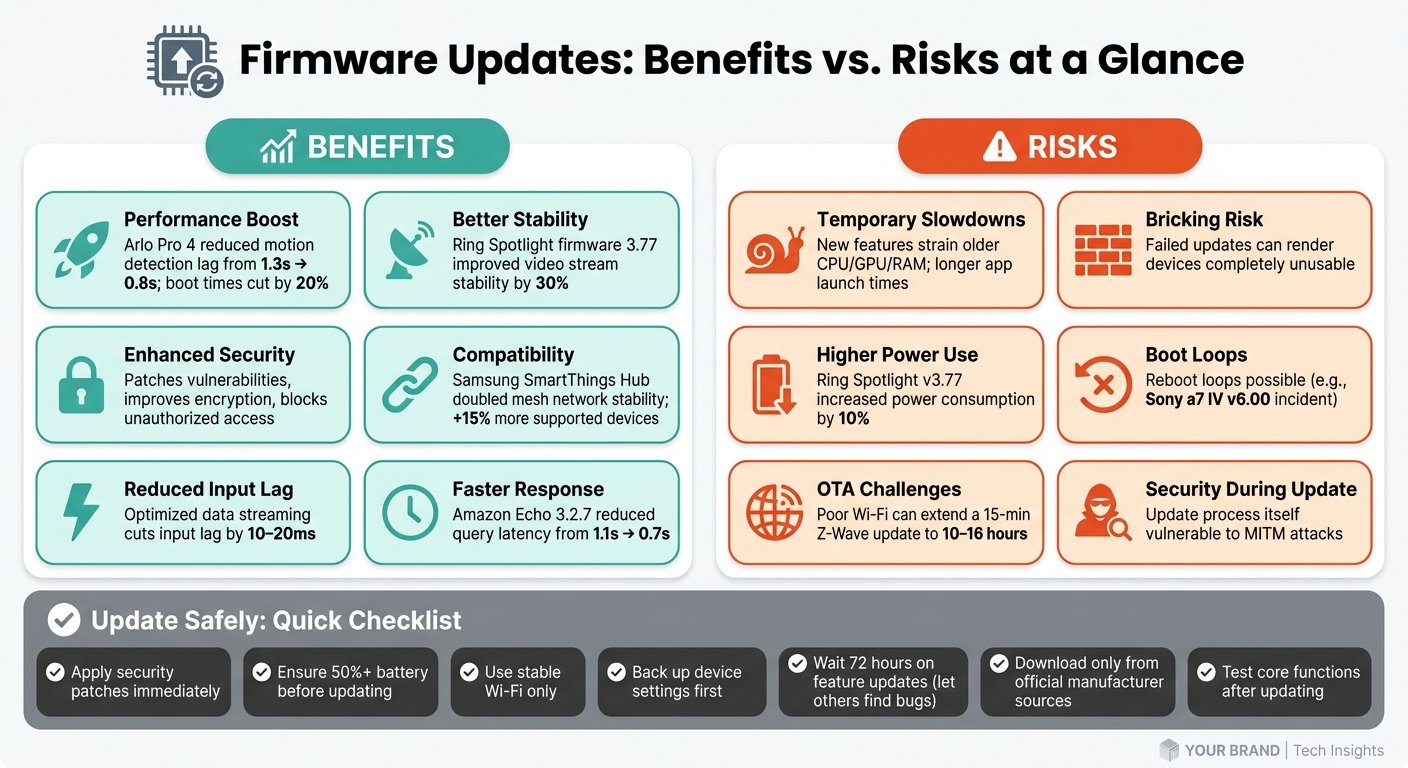
Firmware Updates: Benefits vs. Risks at a Glance
Firmware updates are a mixed bag - they can make a device faster, safer, and more compatible, but they can also introduce new problems. For instance, some updates have significantly reduced boot times and improved responsiveness, showcasing their potential. On the flip side, poorly executed updates can slow things down or even cause critical failures. The table below highlights the pros and cons of firmware updates across different areas.
Security is one area where updates are hard to dismiss. Simardeep Singh, a Big Data and DevOps Engineer, explains it well:
"Firmware updates are a primary method for patching vulnerabilities and enhancing the functionality of these systems. However, this essential process is not without risks."
That last point is crucial. Even though updates fix vulnerabilities, the update process itself can sometimes expose systems to risks like man-in-the-middle (MITM) attacks.
Comparison Table
| Area | Pros of Updating | Cons/Risks of Updating |
|---|---|---|
| Speed | Optimized data streaming; reduced input lag by 10–20ms | Temporary slowdowns during installation |
| Stability | Fixes for known crashes and bugs | Risk of reboot loops or "bricking" if power fails |
| Security | Patches vulnerabilities; protects against malware | Update process can be exploited (e.g., MITM attacks) |
| Compatibility | Adds support for new hardware and accessories | May remove older protocol support (e.g., WEP) |
| Data Integrity | Enhanced image and data processing algorithms | Bugs can lead to data corruption or loss |
The key takeaway? Firmware updates are rarely all good or all bad - they often improve one area while potentially causing issues in another. For example, an update might enhance streaming stability but increase power consumption. This is why taking the time to read release notes is so important before deciding to update. Up next, we’ll share actionable tips to help you manage firmware updates wisely.
How to Manage Firmware Updates the Right Way
Managing firmware updates effectively is all about striking the right balance between reaping their benefits and avoiding potential headaches.
When to Update
Firmware updates are tools designed to improve devices, but they’re not always necessary. As Fstoppers wisely puts it:
"Firmware updates are tools, not obligations. ... Knowing when not to install your firmware is just as important as knowing when to."
One major exception to this rule is security patches. These should be applied immediately, especially for devices like smart locks or cameras, where security is paramount. Timing matters too - avoid updating before important events. A poorly timed update that goes wrong can leave you scrambling to fix your device when you need it most.
To prioritize updates, follow this order: security patches first, then stability fixes if your device is acting up, and finally, feature updates - but only if they bring clear value to how you use the device.
How to Avoid Update Failures
Failures during firmware updates are often caused by power interruptions or unstable connections. To avoid this, make sure your device is fully charged and connected to a reliable Wi-Fi network. Choosing off-peak times, like late at night, can also reduce the risk of network interference.
Before starting the update, back up your device settings. This way, you won’t lose your custom configurations if something goes wrong. It’s also a good idea to check user reviews or community feedback about the update. This can alert you to potential issues others have encountered.
Finally, always download updates directly from the manufacturer’s official site. Third-party sources can contain corrupted or even malicious files, which could compromise your device.
Checking Device Performance After an Update
Once the update is complete, restart your device, verify the firmware version, and test its core functions. For example, check voice commands, motion detection, or app controls - whatever features are essential to your device. As Sandeep Mendiratta, Senior Engineering Manager at Target, advises:
"Treat firmware updates with the same discipline as software updates."
If you notice problems like slower response times, connectivity issues, or unexpected battery drain, try narrowing down the source. For instance, if a router update causes Wi-Fi issues, switching to a wired Ethernet connection can help you determine if the problem lies with the firmware's wireless handling.
If performance issues persist for more than 24 to 48 hours, see if the manufacturer has released a follow-up patch or offers a rollback option. These steps can help you enjoy the benefits of firmware updates without compromising your device’s performance.
Conclusion: Weighing Updates Against Performance
Firmware updates often involve trade-offs. For example, Amazon Echo firmware 3.2.7 improved device responsiveness by reducing query latency from 1.1 to 0.7 seconds - an impressive improvement. But not all updates go smoothly. Take the Sony a7 IV v6.00 incident, where a misstep caused reboot loops, demonstrating the risks of insufficient testing or oversight.
To navigate these challenges, it’s important to approach updates strategically. For security patches, like the urgent fix for the ESPHome vulnerability CVE-2025-57808 in early 2025, immediate action is critical. On the other hand, feature and maintenance updates can often wait. A delay of about 72 hours gives early adopters a chance to uncover any bugs, reducing the risk for others.
As one industry expert aptly puts it:
"Missing updates is like refusing service checks on a train - small issues compound into costly problems."
For a smooth update experience, ensure optimal conditions: stable Wi-Fi, at least 50% battery, and a backed-up configuration. After updating, test essential functions to catch any issues early.
When done thoughtfully, firmware updates remain one of the simplest and most effective ways to enhance the lifespan and security of your smart devices. Preparation is key to reaping the benefits while minimizing risks.
FAQs
How do I tell if a firmware update will slow my device down?
When deciding whether to install a firmware update, take a close look at the release notes. These notes usually outline any performance tweaks, bug fixes, security improvements, or new features included in the update. While updates are generally beneficial, major changes can sometimes lead to temporary slowdowns as your device adjusts to new processes or compatibility changes.
It's also a good idea to check user feedback. Other users might share insights about how the update has impacted their devices. If the update resolves critical issues or introduces essential features, it might be worth the slight risk of a temporary performance dip. Keep in mind that slowdowns can often result from background processes running right after the update is installed, so give your device some time to settle.
What should I do if an update gets stuck or my device won’t boot?
If your update is stuck or your device refuses to boot, you can try resetting or recovering it.
For computers, press and hold the power button for about 10 seconds to turn it off completely. Then, press the power button again to restart the device.
For smartphones or similar devices, hold down both the power button and the volume down button simultaneously for about 10 seconds to force a restart.
Make sure your device is connected to a stable power source during this process to avoid further issues.
Can I roll back to an older firmware version if performance gets worse?
If you're experiencing performance issues, you can revert to an older firmware version. However, keep in mind that this process will erase all data on the device. To prevent losing anything important, make sure to back up your data beforehand.