A cloud disaster recovery plan is how I get systems and data back after an outage, attack, deletion, or regional failure. And the stakes are high: one unplanned outage costs large companies $5.6 million on average, while ransomware hit backup systems in 94% of attacks in 2025.
If I had to boil the process down, it looks like this:
- List what I need to protect: apps, data, devices, cloud services, DNS, keys, and certificates
- Rank risk and downtime impact: what breaks first, what costs the most, and what depends on what
- Set RTO and RPO targets: how long I can be down and how much data I can lose
- Pick backup and recovery methods: backups, snapshots, replication, failover, and immutable copies
- Assign people and write steps: named owners, escalation paths, restore order, and outage messages
- Test the plan on a schedule: weekly checks, monthly test runs, quarterly drills, and yearly full tests
Here’s the core idea in plain English: backup alone is not enough. I also need restore order, access to keys and credentials, clear owners, and tested runbooks. Otherwise, recovery slows down when time matters most.
Quick comparison
| Step | What I decide | Main output |
|---|---|---|
| 1. Assess risk | What matters most | Asset list, risk ranking, dependencies |
| 2. Set targets | How much downtime/data loss I can accept | RTO and RPO by workload |
| 3. Choose methods | How I will restore each workload | Backup, retention, security, recovery design |
| 4. Document actions | Who does what during an outage | Runbook, contacts, escalation path, checklists |
| 5. Test and update | Whether the plan works now | Test results, fixes, updated plan |
That’s the whole framework: know what I have, decide what matters, choose how to recover it, document the steps, and test it before a bad day hits.
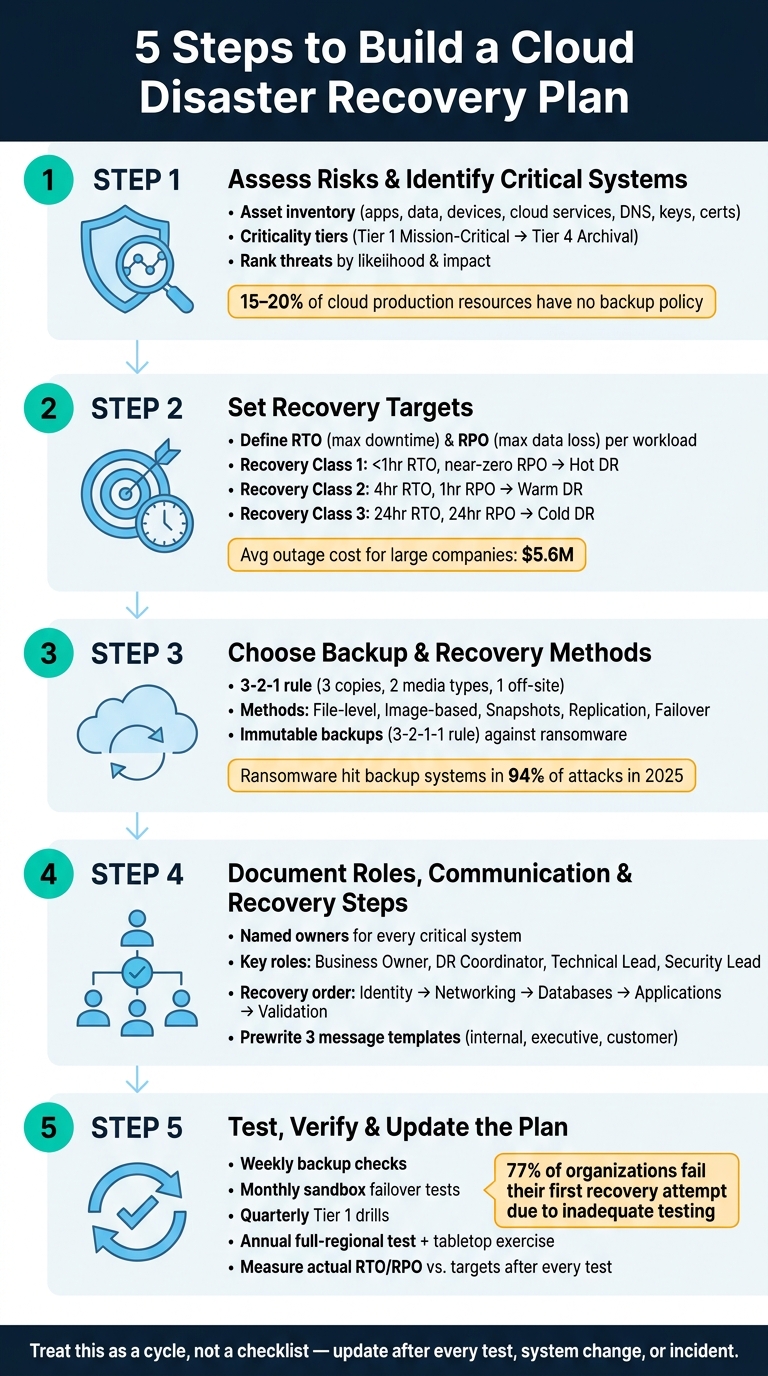
5-Step Cloud Disaster Recovery Plan Framework
🔥 The Ultimate Guide to Disaster Recovery: RTO, RPO, & Failover!
sbb-itb-dc5b06c
Step 1: Assess Risks and Identify Critical Systems
Start with a full inventory of every data set, app, device, and cloud service your business depends on.
Inventory Your Data, Applications, and Devices
Write down the data, apps, devices, and cloud services you use. Then group them by what they store, run, and connect to. The goal is simple: know what you have before something breaks.
One practical way to sort everything is by criticality tier:
| Tier | What Belongs Here | Examples |
|---|---|---|
| Tier 1 – Mission-Critical | Systems that stop revenue or operations immediately if lost | Payment portals, customer-facing applications, production databases, identity/authentication services (IAM) |
| Tier 2 – Business-Critical | Internal systems that slow things down but don't stop the business | ERP platforms, email, internal reporting systems, support applications |
| Tier 3 – Operational / Lower Priority | Systems you can restore after higher-priority items are back online | Development environments, internal wikis, staging servers |
| Tier 4 – Archival | Historical data kept for reference or long-term storage | Old project archives, sandbox test data |
It’s easy to focus on the obvious systems and miss the small stuff that can cause big headaches later. That includes SSL certificates, encryption keys, DNS records, and manual DNS failover steps. These often get skipped in documentation, but during recovery, they can make the difference between a short outage and a long one.
You should also document infrastructure and hardware, including:
- VMs, clusters, and storage buckets
- Managed services, on-prem servers, NAS devices, and edge hardware
This matters more than many teams think. About 15% to 20% of cloud production resources don’t have a backup policy because teams spin up untracked resources.
Rank Threats by Likelihood and Impact
Once the inventory is done, rank each item by likelihood and impact. That gives you a clearer picture of where the biggest risks sit.
| Risk Type | Examples | Impact |
|---|---|---|
| Cyber/Malicious | Ransomware, compromised credentials, theft | High - data loss plus extended downtime |
| Operational | Human error, misconfiguration, bad deployments, accidental deletion | Medium to High - service disruption |
| Infrastructure | Hardware failure, ISP outages, cloud provider regional outages | High - full site unavailability |
| Environmental | Power loss, hurricanes, regional natural disasters | Variable - local to widespread |
For each system, assign an hourly downtime cost in U.S. dollars. That puts the risk in plain business terms. A payment portal outage is a whole different problem from a staging outage, and that dollar figure helps you decide what needs backup, failover, and recovery work first.
Also, map dependencies, not just systems. A web app might look like one service on paper, but it depends on its database, DNS, identity, and networking. If those pieces don’t come back first, the app is still down.
Use this inventory and risk ranking to set recovery targets in Step 2.
Step 2: Set Recovery Targets
Now take the risks and dependencies from Step 1 and turn them into RTO and RPO targets for each critical workload.
Define RTO and RPO for Each Critical Workload
Recovery Time Objective (RTO) is the longest outage the business can live with. Recovery Point Objective (RPO) is the most recent data you can afford to lose, which drives backup frequency.
Here’s a simple way to think about it: if a customer database can only be offline for 1 hour, its RTO is 1 hour. If the business can tolerate losing no more than 15 minutes of data, its RPO is 15 minutes.
Set these targets per workload, not across the whole environment. A payment portal and an internal wiki may both matter, but they do NOT need the same recovery tier.
Balance Recovery Targets with Budget and Risk
Tighter RTO and RPO targets cost more and add setup complexity. Near-zero RPO often means continuous replication. Low RTO often means a hot or warm standby. That’s the tradeoff: the more downtime and data loss you want to avoid, the more you’ll usually spend.
Match the level of protection to how much each workload matters.
Use these targets to choose the right recovery design.
| Recovery Class | Example Systems | RTO Target | RPO Target | Recovery Design |
|---|---|---|---|---|
| Recovery Class 1 | Payment portals, customer databases | < 1 hour | Near-zero | Hot DR: Active-Active or Continuous Replication |
| Recovery Class 2 | Email, CRM, HR systems | 4 hours | 1 hour | Warm DR: Pilot Light or Warm Standby |
| Recovery Class 3 | Internal wikis, dev environments | 24 hours | 24 hours | Cold DR: Backup and Restore from cloud storage |
These targets shape the backup and recovery method you pick next.
Business owners should approve the targets because they decide what downtime and data loss the business can accept. In the next step, you’ll turn those targets into a backup and recovery plan.
Use these targets to choose backup frequency, retention, and recovery method in Step 3.
Step 3: Choose Cloud Backup and Recovery Methods
Use the RTO and RPO targets from Step 2 to pick the right backup and recovery method for each workload. The goal is simple: meet recovery targets without paying for more than you need. Once you choose a method, write down who handles each recovery task and how the team communicates during an outage.
Set Backup Scope, Retention, and Security Controls
Your plan should spell out what gets backed up, how often backups run, and how long each copy stays available. That includes databases, VMs, SaaS data, and network configurations. A good place to start is the 3-2-1 rule: keep three copies, on two types of media or services, with one copy off-site or in a separate cloud region.
Retention should be tiered. In plain English, that means keeping different backup copies for different time periods. Use short-term, medium-term, and long-term retention to cover accidental deletion, troubleshooting, and compliance needs.
Security controls matter here too. Document:
- Encryption at rest and in transit
- Key ownership
- RBAC
- MFA
- Backup storage kept in a separate account or tenant, so a production breach doesn't hit recovery data too
It also helps to use immutable backups as another layer of protection. Add an immutable copy as part of the 3-2-1-1 rule to guard backup data against ransomware and insider attacks.
Plan How Recovery Will Actually Work
The recovery method should fit the workload. Not every system needs the same treatment. A shared drive and a payment database shouldn't be handled alike.
Use file-level backups when you need to restore specific files. Use image-based backups for full rebuilds. Snapshots work well for point-in-time VM or storage recovery. Replication fits workloads with low RPO needs. Failover is the choice for critical workloads that can't sit idle for long.
| Method | Recovery Speed | Complexity | Typical Use Case |
|---|---|---|---|
| File-level backup | Slower | Low | Selective restoration of specific files, shares, or endpoint data |
| Image-based backup | Moderate | Low | Full machine rebuilds |
| Snapshots | Fast | Medium | Virtual machines and storage systems |
| Replication | Fast | Medium | Transactional databases with low RPO needs |
| Failover | Near-instant | High | Shifting workloads to a recovery environment during an outage |
Recovery order matters too. Bring back identity services first. After that, restore networking components like routing, firewalls, and DNS. Then recover databases, application tiers, and finish with validation. It's also smart to include granular recovery, so the team can restore a single file, table, or record instead of rolling back an entire system.
Next, turn these methods into clear roles, escalation paths, and recovery checklists.
Step 4: Document Roles, Communication, and Recovery Steps
Once you pick the recovery method in Step 3, the next job is simple: spell out who does what, how people talk to each other, and what happens first. A recovery plan doesn't work because it looks good in a document. It works because the right people can act on it under stress.
Assign Owners and Escalation Paths
Every critical system needs a named owner. Not a team name. Not “IT.” One person.
Your plan should define these roles:
| Role | Primary Responsibility |
|---|---|
| Business Owner | Approves recovery priorities, defines downtime tolerance, and authorizes disaster declarations |
| DR Coordinator | Leads failover planning, coordinates the response team, and manages stakeholder updates |
| Technical Lead | Executes the actual restoration of data, applications, and infrastructure |
| Backup Administrator | Manages backup schedules, ensures data integrity, and handles restore testing |
| Security Lead | Verifies encryption, manages recovery keys, and oversees ransomware response |
| Cloud Provider Contact | Manages communication and escalation with cloud providers or third-party support |
Be explicit about who can declare a disaster and who can trigger a switch to the recovery region. Don't leave that to guesswork. Write down the exact thresholds that allow it.
Each critical role also needs a backup. And each system should map to:
- a primary owner
- an alternate contact
- a clear escalation path
That way, if one person is out, asleep, or unreachable, the plan doesn't stall.
Write Clear Recovery Checklists
Your recovery checklists should follow the Step 3 order every time: identity, networking, databases, applications, then validation. This keeps the team from restoring things out of sequence and hitting avoidable roadblocks.
Each checklist should say:
- where credentials and recovery keys are stored
- which backup to restore
- which checks confirm the restore worked and the data is intact
Prewrite the three message templates you'll need during an outage: internal status updates with ETAs, executive briefs with business impact, and customer notices in plain language.
Store the runbook, contact list, and emergency credentials in two off-cloud locations, with one of them offline or printed.
That gives Step 5 something concrete to test, instead of leaving the team to piece it together in the middle of an incident.
Step 5: Test, Verify, and Update the Plan
The Step 4 runbook only matters if it holds up when things go sideways. Testing is what shows you the weak spots: old docs, changed systems, missing steps, and recoveries that look fine on paper but fail in practice. A backup that has never been restored is still an unknown.
Use the runbook, roles, and recovery order from Steps 3 and 4 as the script for every test. Go in this order:
- Identity
- Network
- Database
- Application
- Validation
Then measure each test against the RTO and RPO targets you set earlier.
Run Tabletop and Recovery Tests
Start with a tiered schedule: weekly backup checks, monthly sandbox failover tests, quarterly Tier 1 recovery drills, and an annual full-regional test. Include at least one tabletop exercise each year so the team can walk through roles, decisions, and escalation paths.
After each test, measure the actual restore time from restore start to service availability and compare it with your documented RTO. Compare measured restore time and data loss directly to your RTO and RPO targets. Verify data integrity, application health checks, IAM access, and DNS resolution. A restore is not done until the service is running.
Review the Plan on a Set Schedule
Treat reviews as part of the plan, not something you tack on later. Testing matters, but so do the moments when your business changes. Review the plan after a new app launch, staffing change, vendor change, office move, or security incident. Even if nothing major happens, do a lightweight quarterly review and a thorough annual audit and test. Write updates in U.S. date and time format, such as "Q1 2026, second Friday, 2:00 AM EST", so there’s no confusion.
Each test should also produce a short report with the measured RTO/RPO, any issues found, and assigned action items. That record helps with SOC 2 and ISO 27001 audits too. A cloud DR plan stays useful only if it matches current systems, owners, and dependencies.
Conclusion: Keep Your Plan Current
Once you’ve gone through the five steps, the work doesn’t stop. Treat them like a cycle, not a one-and-done checklist.
That point matters because cloud setups change fast. Systems shift, people leave or change roles, and new apps go live all the time. If no one updates the plan, it drifts. Every test should feed changes back into the plan. Audits show that 15–20% of production resources often have no backup policy assigned because of drift in fast-moving cloud environments.
A plan also needs to work when the pressure is high. In a crisis, no one wants to dig through a long, messy document. Keep the runbook short, clear, and easy to find. Keep docs lean, assign clear owners, and make sure the current copy is available during an outage.
Testing and updates aren’t nice extras. They’re the difference between a smooth recovery and a bad day getting worse. 77% of organizations fail their first recovery attempt due to inadequate testing. A plan that gets tested, updated, and can actually be followed turns a crisis into a recoverable incident. Testing and updates are what keep the plan usable when recovery starts.
FAQs
How do I choose the right RTO and RPO?
Choose RTO and RPO based on business impact, not just IT preferences. A Business Impact Analysis (BIA) helps you tie each application and data set to the job it supports and the cost of downtime.
From there, group workloads by criticality. Mission-critical systems usually need tighter targets. Less critical tools can often handle more downtime and some data loss.
That matters because tighter targets also mean more cost and more setup work. So instead of using the same target for everything, set RTO and RPO by tier. That way, your spending lines up with the value of the data and services you're protecting.
What should I back up besides apps and data?
Back up your entire IT infrastructure, not just apps and data. That means the parts people often miss, like DNS settings, identity management systems, cloud network segments, message queues, and storage accounts.
You should also document physical and virtual servers, third-party integrations, and legacy apps. The goal is simple: show how everything fits together so your team isn’t piecing it together under pressure.
Your plan should spell out details like:
- Network reconfigurations
- IP mappings
- The right order to restart services after a disruption
If one system comes back online before a dependency is ready, things can fail fast. That’s why the connections between systems matter just as much as the systems themselves.
How often should I test my DR plan?
Test your disaster recovery plan at least once every quarter so it stays useful without putting too much strain on engineering time. At the bare minimum, experts suggest running tests twice a year to help improve recovery speed.
A good testing cadence usually includes a mix of:
- backup restoration tests
- tabletop exercises
- partial or full failover drills