- SteelSeries Arctis Nova Pro Wireless Headset: Mix up to four audio sources, enjoy 22-hour hot-swappable batteries, and experience Hi-Res Wireless audio for $399.
- HyperX QuadCast S Microphone: Tap-to-mute, RGB lighting, and four recording modes for $159.99, ideal for streamers and podcasters.
- Secretlab Titan Evo Nanogen Gaming Chair: Durable NanoGen leatherette and advanced lumbar support, priced at $799.
- Secretlab Magnus Pro Desk: Motorized standing desk with integrated cable management, starting at $799.
- Razer DeathAdder V3 Hyperspeed Mouse: Lightweight (55g), 26K DPI sensor, and 100-hour battery life for $69.99.
- SteelSeries Apex Pro TKL Keyboard (Gen 3): Adjustable actuation switches and rapid input features, priced from $219.99.
- Xbox Core Controller: Affordable ($65), ergonomic, and compatible with various platforms.
- Gigabyte Aorus FO32U2 Pro Monitor: 32" OLED, 4K at 240Hz, and advanced gaming tools for $1,200.
- SteelSeries Arctis GameBuds: Dual-wireless earbuds with 7ms latency and 10-hour battery life, priced at $159.99.
- WD_Black P40 SSD: Portable storage with speeds up to 2,000 MB/s, starting at $99.99.
- PlayStation VR2 Headset: Immersive 4K HDR visuals and eye-tracking features for $549.99.
- Asus ROG Rapture GT-BE98 Pro Router: Wi-Fi 7 with 30 Gbps throughput and dual 6 GHz radios for $699.99.
These gadgets cater to casual and competitive gamers, offering cutting-edge features and practical solutions to enhance gameplay. Whether you’re upgrading audio, visuals, or comfort, there’s something here to elevate your gaming setup.
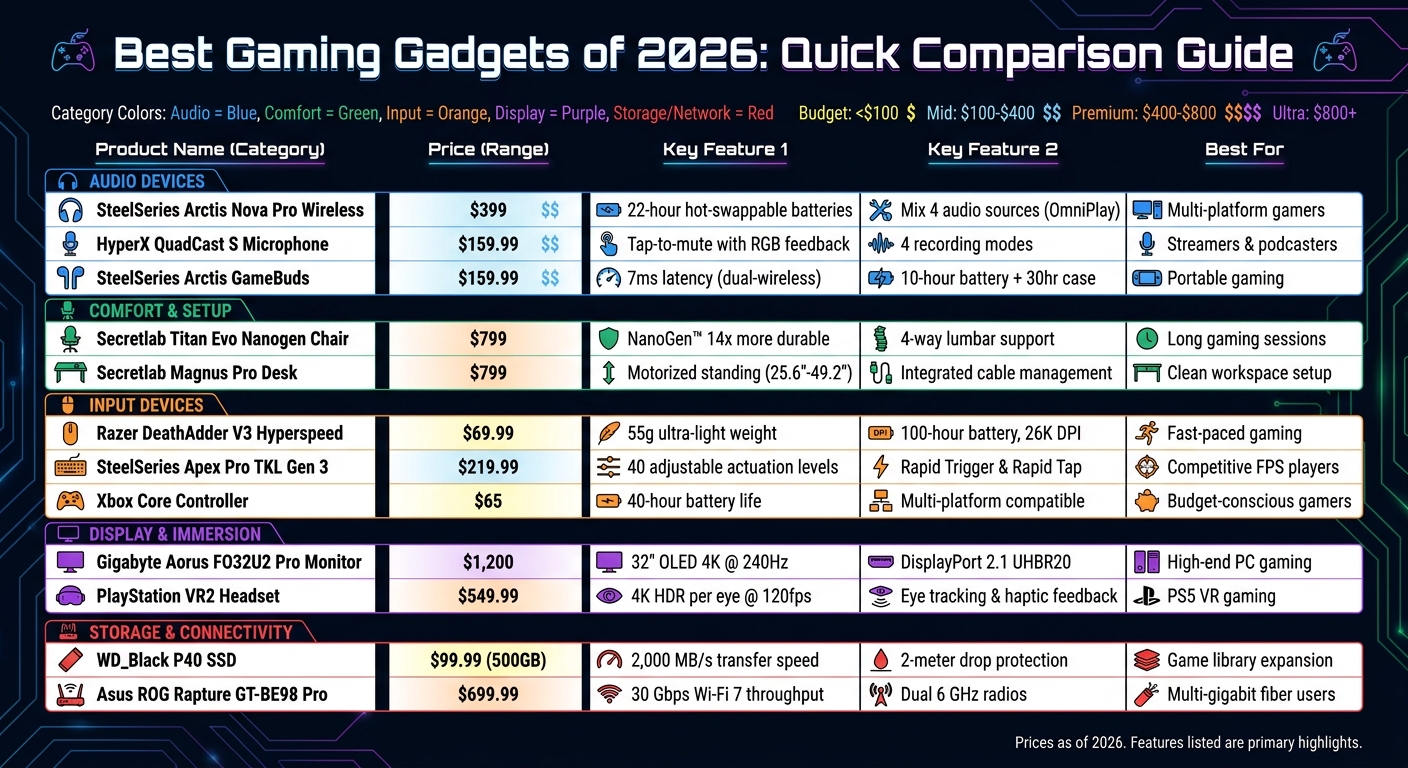
Best Gaming Gadgets 2026: Price and Feature Comparison Chart
1. SteelSeries Arctis Nova Pro Wireless Gaming Headset

OmniPlay Technology: A Game-Changer
Released in May 2026, the Arctis Nova Pro Omni introduces OmniPlay, a feature that tackles a common frustration for gamers: juggling multiple audio sources. With OmniPlay, you can mix up to four sources at once - two USB inputs, Bluetooth, and a line-in connection. This means you can game on your PlayStation, chat on Discord via your phone, and stream Spotify from your PC - all without switching inputs. This seamless audio routing is paired with a power system designed to keep you in the game without interruptions.
Hot-Swappable Batteries for Continuous Gameplay
The Infinite Power System ensures you never have to pause mid-game. It uses dual hot-swappable batteries - one charges in the GameHub base station while the other powers the headset. Each battery lasts about 22 hours, so you can keep playing almost endlessly. The GameHub base station also features an OLED display and a control dial, making it easy to tweak EQ settings, volume, or audio sources without needing to open software menus.
Audio Quality That Stands Out
The Arctis Nova Pro Omni doesn’t just focus on convenience - it delivers exceptional audio quality too. It offers 96kHz/24-bit Hi-Res Wireless audio using the LC3+ codec, earning certification from the Japan Audio Society. Custom 40mm neodymium drivers provide a frequency range of 10Hz to 40kHz, while the ClearCast Pro microphone uses AI to cut out 96% of background noise. Its Active Noise Cancellation blocks up to 40% more ambient noise compared to competitors as of October 2025.
"At $399, you're getting a comfortable, high-performance headset with underrated functionality. What you're sacrificing is the cold touch of aluminum." - Andrew Romero, 9to5Google
Build, Comfort, and Pricing
The 2026 Omni model balances advanced features with practical design. Made primarily of plastic for the earcups and base station, it skips the metallic accents found in the $600 Elite version, keeping the price at $399.99. Memory foam ear cushions wrapped in vegan leather and a suspension-style headband ensure comfort during long gaming sessions. Available in Midnight Blue, White, and Graphite, this headset is more than just gaming gear - it’s a versatile audio control hub for multiple platforms.
sbb-itb-dc5b06c
2. HyperX QuadCast S Gaming Microphone
Tap-to-Mute and Visual Feedback
The QuadCast S comes with a tap-to-mute sensor that immediately silences your audio while turning off its RGB lighting. This provides a clear, visual cue that the microphone is muted, making it easy to avoid unintentional audio mishaps. You can also personalize the two-zone RGB lighting using HyperX's NGENUITY software, letting you match it to your setup or mood.
Four Recording Modes for Versatility
This microphone offers four polar patterns to suit different recording scenarios. Whether you're streaming solo with the Cardioid mode, hosting group calls using Omnidirectional, conducting interviews in Bidirectional, or creating ASMR or instrument recordings with Stereo, the QuadCast S has you covered. Switching between these modes is quick and easy with the built-in dial.
Built-In Features for Better Performance
The QuadCast S includes several hardware features designed to enhance your recording experience. An internal pop filter reduces plosive sounds, while the anti-vibration shock mount helps eliminate unwanted noise from desk movements or keyboard clicks. It also offers a physical gain control dial and a 3.5mm headphone jack for real-time, zero-latency monitoring.
Price and Market Position in 2026
Priced at $159.99, the QuadCast S is often discounted to between $139.00 and $149.00 at major retailers. It records audio at 48kHz with a 16-bit depth, powered by three 14mm electret condenser capsules. While the newer QuadCast 2 S offers higher resolution for $199.99, the QuadCast S remains a strong contender thanks to its balance of features and price. PCMag gave it a 4.0/5 rating and an Editors' Choice award, praising its sound quality and the convenient tap-to-mute function.
"The HyperX QuadCast S is a feature-filled USB microphone ideal for streamers, podcasters, or anyone looking to record speech while using a webcam."
– Will Greenwald, Principal Writer, PCMag
26 Cool Gifts for Gamers in 2026 🎮 Must-Have Gaming Gadgets & Gift Ideas
3. Secretlab Titan Evo Nanogen Gaming Chair

This chair takes gaming comfort to the next level, combining cutting-edge materials and ergonomic design for long-lasting support during extended gaming sessions.
Ultra-Soft Material Built to Last
The Titan Evo Nanogen introduces NanoGen™ Hybrid Leatherette, a material that's not only 14 times more durable than standard PU leather but also incredibly soft to the touch. Rigorous testing on 10 million mm² surfaces under loads 300% higher than normal proves its resilience [20,21]. For pet owners, particularly those with cats, this material offers better resistance to claw marks compared to traditional leatherette.
"The NanoGen faux leather is a valid fabric alternative for cat households. Previously, I'd exclusively recommend non-leatherette materials for pet owners."
– Will Greenwald, Principal Writer, PCMag
Comfort Without Compromising Support
The chair’s NanoFoam™ Composite seat uses a dual-layer design, pairing soft microfoam with dense cold-cure foam to deliver both immediate comfort and long-term support. Its PlushCell™ Memory Foam armrests offer 50% more vertical adjustability than typical chairs, while the integrated L-ADAPT™ Lumbar Support adjusts in four directions to align perfectly with your spine [21,22].
Solid Build and Flexible Sizing
The Titan Evo Nanogen is available in two sizes: Regular, for users between 5'7" and 6'2" and up to 220 lbs, and XL, for users between 5'11" and 6'9" with a weight capacity of up to 395 lbs. It reclines up to 165° and is built with a sturdy ADC12 aluminum alloy wheelbase. Assembly is quick, typically under 30 minutes, and the chair includes a 3-year warranty, extendable to 5 years with a social media post featuring the chair [21,22].
Pricing and Reviews in 2026
The Regular model is priced at $799, while the XL version costs $849 - roughly $200–$250 more than the standard Titan Evo. Despite the higher price, reviewers have praised its comfort and durability. IGN gave it a perfect 10/10, calling it a "masterpiece", while PC Gamer rated it 91/100 [23,24].
"This is the most comfortable gaming chair I've ever sat in, and definitely the most comfortable a Secretlab has ever felt."
– Dave James, Editor-in-Chief, Hardware, PC Gamer
4. Secretlab Magnus Pro Gaming Desk
The Secretlab Magnus Pro takes workspace organization to the next level, blending sleek design with smart solutions for cable management and adjustable functionality. It's a motorized standing desk that's all about keeping things tidy while offering flexibility.
Say Goodbye to Cable Clutter
One standout feature of the Magnus Pro is its integrated power supply column, which routes a single cable through the desk leg. This clever design powers the desk and all connected devices, ensuring wires stay hidden - even when you adjust the desk height.
The desk also includes a full-length cable tray that runs across the back and stays discreetly tucked away under a hinged cover, tested to withstand over 10,000 uses. This tray is perfect for stashing power strips, adapters, and extra cables. Plus, the metal desktop is magnet-compatible, so you can attach accessories like cable anchors, headphone holders, or the MAGPAD™ desk mat without needing adhesives or screws.
"The Magnus Pro has the edge on design thanks to excellent cable management features including a power-routing pillar that eliminates wires running from the underside of the desk."
– Will Greenwald, Principal Writer, PCMag
Smooth Adjustments and Sturdy Build
The Magnus Pro is powered by dual electric motors that allow for smooth height adjustments, ranging from 25.6″ to 49.2″. It operates quietly, staying under 50 dB, and moves at a speed of 30 mm/s. The control panel, built into the desk edge, is backlit and includes a lockable standby switch to prevent accidental changes during intense gaming sessions.
The desk's steel frame is built to last, supporting up to 265 lbs and tested for 20,000 lift cycles. These features make it a reliable choice for gamers and professionals alike.
Pricing and User Reviews
The Magnus Pro comes in two sizes: the standard 59.1″ model starts at $799, while the larger XL version (70″ wide with 18% more surface area) is priced at $949. It has received high praise, including a 4.5/5 rating and Editors' Choice award from PCMag and a 9/10 rating from How-To Geek.
However, reviewers have noted that while the desk's cable management and design are top-notch, the cost of add-ons can quickly add up. Accessories like monitor arms range from $149 to $349, and a PC mount is priced at $89. Additionally, due to its weight (125–150 lbs), assembling the desk is a job best done with two people.
"It's the first desk that truly feels like it's meant to be expanded upon."
– Mark LoProto, Tech Reviewer, How-To Geek
5. Razer DeathAdder V3 Hyperspeed Gaming Mouse

The Razer DeathAdder V3 Hyperspeed combines high performance with a budget-friendly price tag. Weighing just 55 grams (1.9 ounces), this ultra-light ergonomic gaming mouse is ideal for fast movements and long gaming sessions without causing hand strain.
Precision That Counts
Its lightweight design is matched by cutting-edge technology for precision. The Focus X 26K Optical Sensor offers an impressive 26,000 DPI with 99.6% resolution accuracy. What makes this mouse stand out is Razer's Dynamic Sensitivity feature in the Synapse software. This lets you tweak cursor acceleration curves, enabling pinpoint accuracy for low-DPI targeting while still allowing rapid 180-degree turns when needed. The Gen-3 Optical Mouse Switches, rated for 90 million clicks with a 0.2ms actuation time, ensure durability and eliminate those annoying double-click issues.
"Its fast, accurate, and smooth performance make it a joy to use, as does its exceptionally light design." – Lewis Maddison, Reviews Writer, TechRadar
Designed for Everyday Gaming
With a 100-hour battery life at a standard 1,000 Hz polling rate, this mouse is built to last through marathon gaming sessions. Its smooth finish provides a secure grip, and the 100% PTFE feet glide effortlessly on cloth pads. The ergonomic shape is slightly smaller than the V3 Pro - about 5% smaller - making it comfortable for a range of hand sizes. While the default polling rate is 1,000 Hz, you can upgrade to an 8,000 Hz polling rate by purchasing the HyperPolling Wireless Dongle for $29.99.
Price and Value
The DeathAdder V3 Hyperspeed is priced at $69.99, a drop from its original MSRP of $99.99, and is available at major retailers like Amazon and Walmart in 2026. PCMag gave it a 4.0/5 rating, naming it the "Best Mainstream Wireless Gaming Mouse" and calling it the top choice under $100. Similarly, TechRadar awarded it 4/5 stars, commending its build quality and lightweight design.
"The Razer DeathAdder V3 HyperSpeed improves on the excellent design of the V3 Pro, making it the sub-$100 wireless gaming mouse to beat." – Francisco Lahoz, Junior Writer/Associate Producer, PCMag
6. SteelSeries Apex Pro TKL (Gen 3) Gaming Keyboard
The SteelSeries Apex Pro TKL (Gen 3) takes gaming keyboards to the next level with an impressive range of customization options, making it a standout choice for gamers in 2026.
At the heart of this keyboard are the OmniPoint 3.0 HyperMagnetic Switches, which allow for 40 adjustable actuation levels ranging from 0.1 mm to 4.0 mm. This level of precision means you can fine-tune the key response to match your exact gaming needs, whether you're aiming for lightning-fast reactions or more deliberate keystrokes.
Features That Set It Apart
This keyboard packs some cutting-edge features designed to enhance gameplay:
- Rapid Trigger: Instantly resets keys for quicker inputs.
- Rapid Tap: Prioritizes the last key pressed, a game-changer for FPS players who rely on counter-strafing.
- Protection Mode: Reduces sensitivity on nearby keys to prevent accidental presses.
Adding to its utility, the integrated OLED display lets you tweak settings and check PC stats without pausing your game.
"The OmniPoint 3.0 switch offers a type of customization that you just can't get from mechanical switches, letting you adjust the actuation point." – Michael Higham, Reviewer, IGN
Built for Durability and Comfort
The Apex Pro TKL (Gen 3) is built to last, featuring a premium aluminum top plate and double-shot PBT keycaps that resist wear and fading. It also includes triple-layer sound-dampening foam and per-key lubrication, giving it a satisfying "thocky" sound and feel. The wireless TKL version weighs 2.15 lbs and delivers 35 hours of battery life with RGB lighting or up to 45 hours with the lighting off.
Price and User Feedback
The wired version of the Apex Pro TKL is priced at $219.99, while the wireless version ranges from $239.99 to $269.99. IGN awarded it a 9/10 and an Editor's Choice designation, praising its exceptional switches and customization. However, some users noted drawbacks like the high price, fixed-switch design, and occasional connectivity hiccups on the 2.4 GHz wireless mode. Fortunately, these issues can be addressed through firmware updates via SteelSeries GG.
"Though the price may be off putting for a wired keyboard of this size, it really earns it with some excellent switches, robust customization, and an excellent feel." – James Bentley, Hardware Writer, PC Gamer
7. Xbox Core Controller

The Xbox Core Controller is a must-have for gamers looking for comfort, reliability, and affordability in one package. With a price tag of $65.00 - and often available for as low as $49.00 at major retailers - it’s a solid option for casual and competitive players alike.
Design and Everyday Comfort
This controller is built with user comfort in mind. It features textured grips on the triggers, bumpers, and back case, ensuring a secure hold even during long gaming marathons. The hybrid D-pad, with its sunken, dish-like design, offers satisfying tactile feedback, making it perfect for precise platforming and fighting games. Add in the smooth, responsive sticks, and you’ve got a controller that feels just right in your hands.
"The default Xbox gamepad strikes the right balance of quality, comfort, versatility, and price." – Cameron Faulkner, Editor, The Verge
Connectivity and Battery Performance
The Xbox Core Controller is incredibly versatile, supporting Xbox Wireless, Bluetooth, and USB-C connections. It works seamlessly with Xbox Series X|S, Xbox One, Windows PCs, iPhones, and Android devices. Powered by two AA batteries, it delivers up to 40 hours of gameplay, giving you plenty of time to dive into your favorite games without constant interruptions.
Personalization Options
With the Xbox Accessories app, you can remap buttons and create custom profiles tailored to your gaming style. For those who want a more personalized touch, the Xbox Design Lab offers custom versions starting at $79.99. You can even add metallic finishes or engravings, with premium designs reaching up to $124.93. Additionally, the controller’s Impulse Triggers provide haptic feedback directly to your fingertips in supported games, adding an extra layer of immersion.
"You won't find a better wireless controller at this price." – Antonio G. Di Benedetto, Reviewer, The Verge
8. Gigabyte Aorus FO32U2 Pro Gaming Monitor

The Gigabyte Aorus FO32U2 Pro is built for gamers who demand top-tier performance. Priced at $1,200, this monitor offers advanced technology designed to handle gaming needs today and well into the future.
Cutting-Edge Display Technology
This is the first OLED monitor to feature DisplayPort 2.1 with UHBR20, delivering uncompressed 4K resolution at a blazing 240Hz refresh rate and an impressive 80Gbps bandwidth. Its 32-inch Samsung QD-OLED panel offers a stunning 1,500,000:1 contrast ratio, 99% DCI-P3 color coverage, 10-bit color depth, and an ultra-fast 0.03ms response time - about ten times faster than most traditional gaming monitors.
"This OLED monitor might have more graphical capabilities than most PC battlestations can handle... it should be with you through several PC upgrades." – Danielle Abraham, Tech Expert, IGN
Gaming Features and Performance
The FO32U2 Pro doesn’t just rely on its display specs - it’s packed with features designed for competitive gaming. The 240Hz refresh rate ensures smooth gameplay, especially in fast-paced titles. A unique "Tactical Switch" lets players toggle to a simulated 24.5-inch resolution mode instantly, providing a smaller field of view that can be advantageous in esports. Additional tools like Night Vision and Black Equalizer 2.0 enhance visibility in darker scenes, giving players an edge when spotting hidden opponents or details.
Built for Everyday Use
This monitor isn’t just for gaming - it’s also a productivity powerhouse. It includes a built-in KVM switch and 65W USB-C Power Delivery, allowing users to control multiple devices with one set of peripherals and charge laptops directly. The ergonomic stand offers flexibility with height adjustment (up to 5.1 inches), tilt, swivel, and a 90-degree pivot for portrait mode. To address OLED burn-in concerns, Gigabyte incorporates an AI-based "OLED Care" system, and the monitor comes with a 3-year warranty that explicitly covers burn-in issues.
"Gigabyte's Aorus FO32U2 is a superb 32-inch gaming monitor... It's an excellent display by nearly every measure." – Matthew S. Smith, Contributor, PCWorld
9. SteelSeries Arctis GameBuds Gaming Earbuds
The SteelSeries Arctis GameBuds are a portable solution for gamers who want high-quality performance without the bulk of traditional headsets. With a price range of $159.99 to $199.99, depending on the retailer and console version, these earbuds pack impressive features into a lightweight 0.18-oz design. Their standout dual-wireless system ensures seamless switching between gaming consoles and mobile devices.
Dual-Wireless Connectivity for Gaming and Mobile
These earbuds feature a dual-wireless setup. The 2.4GHz USB-C dongle provides ultra-low latency audio - up to 7 times faster than standard Bluetooth - making it perfect for gaming. Meanwhile, Bluetooth 5.3 takes care of mobile device connections. With the "Quick-Switch" triple-tap feature, you can instantly toggle between modes, allowing you to move from gaming to answering calls without any hassle.
"The SteelSeries Arctis GameBuds combine the functionality of a gaming headset with the design of true wireless earphones to solid effect." – Will Greenwald, Principal Writer, PCMag
Optimized Game Audio
The SteelSeries companion app offers over 100 EQ presets tailored to popular games like Fortnite, Baldur's Gate 3, and Alan Wake 2. These presets fine-tune audio in real-time, enhancing critical sounds like footsteps, rustling grass, or distant gunfire to give you an edge in gameplay. Equipped with neodymium magnetic drivers, the earbuds also support 360° Spatial Audio and are fully compatible with PlayStation 5's Tempest 3D Audio.
Designed for Long Gaming Sessions
With 10 hours of battery life (plus an additional 30 hours via the charging case), these earbuds are built for extended play. A quick 15-minute charge provides up to 3 hours of use. Designed using data from 62,000 ear shapes, the earbuds ensure a snug, comfortable fit for gaming sessions that stretch beyond six hours. The IP55 rating for water and dust resistance means they can handle sweat and other challenges from intense gaming or workouts.
"The Arctis GameBuds make even the dullest of games sound phenomenal." – Nikita Achanta, Staff Writer, Tom's Guide
10. WD_Black P40 Game Drive Portable Storage
The WD_Black P40 Game Drive offers a practical solution for gamers facing storage issues. With its USB 3.2 Gen 2x2 interface, it boasts sequential read and write speeds of up to 2,000 MB/s, making load times and file transfers much quicker. It comes in three storage capacities: 500GB for $99.99, 1TB for $179.99, and 2TB for $329.99 [65,66,67]. This compact drive is designed for fast file transfers and efficient game storage.
Lightning-Fast Performance for PC and Console
This portable SSD performs on par with mid-range internal NVMe drives. Tests have shown read speeds of 1.84 GB/s and a 3DMark Storage Benchmark score of 1056, highlighting its impressive capabilities. While PlayStation 5 and Xbox Series X|S users can't play next-gen games directly from the drive, it works as a speedy archival solution. Transferring games to the console's internal storage is much faster than downloading them again.
"The WD_Black P40 Game Drive may be a smaller incarnation of the P50, but the fact that it runs cooler, is more travel-ready, and delivers on its 2GB/s promises is impressive." – Ron Burke, Editor in Chief, Gaming Trend
Built for Portability and Durability
This drive isn’t just about speed - it’s built to last and easy to carry. With dimensions of approximately 4.2" x 2" x 0.5" and weighing just 78.5 grams, it features a sturdy metal chassis designed to handle drops from up to 2 meters (around 6.5 feet) [65,68]. Its thermal management system ensures stable performance during long gaming sessions, and it operates cooler than its predecessor, the P50. The included WD_Black Dashboard software (available for Windows) lets you check the drive's health, monitor its temperature, and customize the RGB lighting to match your gaming setup [67,69]. This thoughtful design caters to gamers who demand both durability and performance.
Optimal Performance Requirements
To hit the advertised 2,000 MB/s speeds, your device must have a USB 3.2 Gen 2x2 port. Using older USB-A ports or standard USB-C connections will reduce speeds to 500–1,000 MB/s. The drive also includes a 5-year limited warranty, which is a step up from the typical 1- to 3-year coverage offered by most external SSDs [66,67].
"The WD Black P40 earns a 9.3/10 due to its outstanding transfer speeds reaching 2000MB/s, excellent thermal management preventing performance drops, and robust build quality." – Lunoo Consumer Electronics Review
11. PlayStation VR2 Gaming Virtual Reality Headset

The PlayStation VR2 brings the world of virtual reality to PS5 owners without the need for a gaming PC. With an MSRP of $549.99, it’s often available for $399.00 to $400.00 at major retailers like the PlayStation Store and Best Buy as of May 2026. The headset boasts dual OLED displays with a resolution of 2000 x 2040 pixels per eye, delivering 4K HDR visuals at up to 120fps. That’s four times the resolution of the original PlayStation VR. Its 110° field of view adds to the immersive experience.
PC-Level Visuals and Smart Eye Tracking
The PS VR2 takes its visual capabilities to the next level with advanced tracking and sensory features. A standout feature is its intelligent eye tracking, achieved through infrared cameras. This allows for foveated rendering, focusing graphical power on the areas you're looking at. The headset also includes haptic feedback via a built-in motor, creating physical sensations that match in-game actions. Its Sense controllers add to the experience with adaptive triggers that offer dynamic resistance, and they last between 3 to 5 hours per charge.
"The PS VR2 packs in the best of high-end PC VR, including innovative features like eye tracking, as well as something we've never seen before: Haptics for your head!"
– Devindra Hardawar, Senior Editor, Engadget
Easy Setup and Everyday Use
Setting up the PS VR2 is far simpler than its predecessor. Gone are the days of external cameras and breakout boxes - this model connects to your PS5 with a single 14.7-foot USB-C cable. With four built-in cameras for inside-out tracking, it’s ready to go right out of the box. The headset itself weighs just 19.8 ounces, making it 1.5 ounces lighter than the original PS VR and about 9 ounces lighter than the Valve Index. A handy "See-through View" button lets you quickly check your surroundings without removing the headset, and the Cinematic Mode allows users to play non-VR PS5 games on a virtual 1080p HDR screen.
Broader Game Library with PC Compatibility
In August 2024, Sony released a $60 official PC adapter, unlocking access to thousands of VR titles on Steam. This addition greatly expands the headset’s library beyond PS5 exclusives, making it a versatile option for gamers. While it has received glowing reviews - like a 4.5/5 from PCMag (Editors' Choice), 9/10 from IGN, and 5/5 from The Telegraph - some criticisms persist. The lack of backward compatibility with original PS VR titles and the tethered cable, which can limit movement, are common concerns.
"The PlayStation VR2 is a comprehensive upgrade that tops its predecessor in terms of graphics, sound, and tracking technology, making it a must-buy headset for PS5 owners interested in virtual reality."
– Will Greenwald, Principal Writer, PCMag
12. Asus ROG Rapture GT-BE98 Pro Gaming Router

The Asus ROG Rapture GT-BE98 Pro is designed for gamers who won’t settle for anything less than top-tier network performance. As of May 2026, it’s priced at $699.99 and offers a total theoretical throughput of an impressive 30,000 Mbps across its four bands. What sets it apart is its dual 6 GHz radios - one can be dedicated solely to gaming, while the other handles mesh backhaul or other high-bandwidth tasks. During professional testing, the router achieved a standout 6 GHz throughput of 3,075 Mbps at close range, outperforming standard options by a wide margin. This makes it a powerhouse for both wireless and wired gaming setups.
Wired Connectivity Built for the Future
The GT-BE98 Pro doesn’t just excel in wireless performance; its wired options are equally robust. It includes two 10GbE ports, one specifically optimized for gaming, and four 2.5GbE ports, making it ideal for multi-gigabit fiber connections or high-speed NAS setups. Gamers will appreciate features like triple-level game acceleration and the Game Radar tool, which helps identify the game servers with the lowest ping before you even start playing. Mobile gamers aren’t left out either - Mobile Game Mode, accessible through the ASUS router app, prioritizes smartphone gaming traffic to minimize lag.
Performance That Keeps Its Cool
Under the hood, the router is powered by a 2.6 GHz quad-core CPU and 2GB of DDR4 RAM, ensuring it can handle heavy traffic without breaking a sweat. To prevent overheating during demanding 30 Gbps operations, it’s equipped with an internal heatsink, a heat-plate assembly, and strategically placed ventilation. At 4.41 pounds and over 14 inches in width and depth, it’s a sizable device, so you’ll need a dedicated spot for it. The router runs on ASUSWRT and includes AiProtection Pro by Trend Micro, offering enterprise-level security and parental controls without requiring a subscription.
"The GT-BE98 Pro delivered the fastest 6GHz throughput scores we've seen from any router." – John R. Delaney, Contributing Editor, PCMag
Who Should Buy It
With a 4.0/5 rating from PCMag, the GT-BE98 Pro is praised for its “blazing throughput performance” and extensive multi-gigabit port options. However, its large size and bold gamer-centric design might make it tricky to fit into some spaces. This router is overkill for most households - without multi-gigabit internet or a fleet of Wi-Fi 7 devices, much of its potential will go unused. But for hardcore gamers with high-speed fiber and cutting-edge gaming gear, it’s a worthwhile investment. If you’re a casual user, a more budget-friendly Wi-Fi 6E router might be a better fit. For those who demand top-tier speed and reliability, the GT-BE98 Pro is a serious contender for the ultimate gaming setup.
Conclusion
The 12 gaming gadgets highlighted here address common challenges gamers face while adding practical value to their setups. With GPU and CPU prices still inflated due to shortages tied to AI-driven demand, upgrading peripherals remains a smart and budget-friendly way to enhance your gaming experience. High-end mice, fast-response keyboards, and high-refresh-rate monitors help minimize inconsistencies, ensuring your performance is determined by skill rather than unreliable hardware. This reflects a broader industry movement toward technology that prioritizes function and performance over flashy specs.
Modern gaming gear focuses on reducing friction and enhancing usability. For instance, wireless dongles now offer latency as low as under 2 milliseconds. Many of these devices are designed for multi-platform compatibility and even support content creation workflows, with regular firmware updates ensuring they stay up-to-date.
The right gadget for you depends on identifying your biggest gaming hurdles. If comfort is your priority, consider upgrading your chair or controller. Struggling with precision? A better mouse or a monitor with a higher refresh rate can make a difference. Competitive players will appreciate low-latency wireless setups and fast-trigger keyboards, while fans of immersive single-player games will benefit more from OLED screens and spatial audio headsets. Portable gamers, on the other hand, should look for handheld devices with long battery life and compact storage solutions that maintain performance on the go.
"The gadgets worth caring about are the ones that improve the game you already play, the stream you already run, and the competitive habits you already have." - Jordan Vale, Senior Gaming Editor
As this article emphasizes, the best gadgets are those that align with your specific gaming style. With the global gaming accessories market expected to grow from $13.09 billion in 2025 to $23.14 billion by 2031, investing in tools that address everyday frustrations can help you game more effectively, stream more smoothly, and play without being held back by hardware limitations.
FAQs
Which gadget should I upgrade first for the biggest impact?
Upgrading your gaming controller can be a game-changer, quite literally. New models like the Valve Steam Controller and HyperX Clutch Talon come packed with advanced, customizable features that take gameplay to the next level. These controllers are built to boost precision, comfort, and overall performance, making them a smart choice whether you're a casual gamer or someone who takes their gaming seriously.
Do I need Wi‑Fi 7 or is a gaming router overkill for me?
Whether you should go for Wi-Fi 7 or a gaming router really comes down to your gaming needs and how demanding your online activities are. Wi-Fi 7 offers faster speeds, reduced latency, and improved stability, making it perfect for competitive gamers or those who stream content regularly. However, for most casual gamers, a reliable router with Wi-Fi 6 or even Wi-Fi 5 will usually do the job, as long as your internet connection is stable. While Wi-Fi 7 is built with the future in mind, it’s not a must-have for everyone right now.
What should I check to ensure a 4K 240Hz monitor works with my setup?
To make sure everything works smoothly, double-check these key points:
- Graphics Card: Make sure your GPU is capable of supporting 4K resolution at 240Hz and has the required HDMI 2.1 or DisplayPort 1.4/2.0 connections.
- Ports: Confirm that both your monitor and GPU have compatible ports to achieve 4K at 240Hz.
- Drivers: Keep your GPU drivers up to date to enable these advanced features.
- Performance: Verify that your GPU has the power to handle the heavy demands of 4K resolution running at 240Hz.